

命令式构建 ChatDev Lite
本教程用命令式方式逐步创建节点与连边(create_node / create_edge),最终得到与声明式版本等价的简化版 ChatDev Lite。
说明:本页是“操作优先”的写法;声明式版本见
声明式构建 ChatDev Lite。
约定:与声明式教程保持一致,本页示例强调两类机制的对照:
- Step 1~Step 2 主要通过 Edge 的 key 契约传递字段,展示“水平消息传递”的基本形态;
- 从 Step 3 起,将关键状态提升为 RootGraph attributes,通过
pull_keys / push_keys在 Phase 间同步,减少 Edge 传参负担。
Step 1 工作流如何连接(双 Agent Phase)
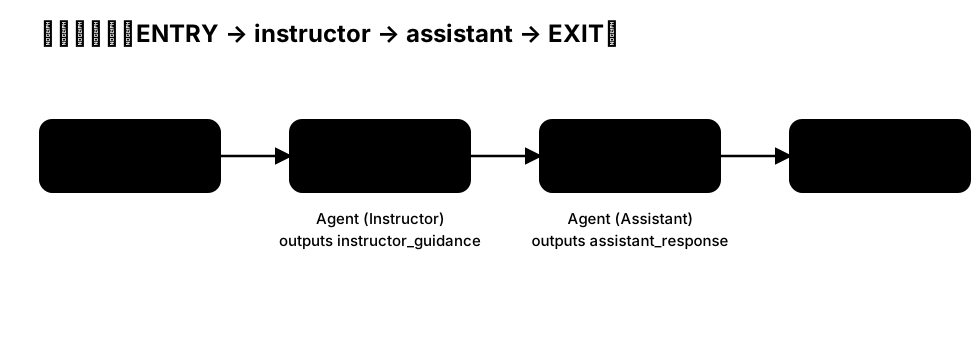
先从一个最小的 Phase 开始:ENTRY → instructor → assistant → EXIT。
import os
from masfactory import RootGraph, Agent, OpenAIModel, HistoryMemory

model = OpenAIModel(
    model_name=os.getenv("MODEL", "gpt-4o-mini"),
    api_key=os.getenv("OPENAI_API_KEY"),
    base_url=os.getenv("BASE_URL"),
)

history = HistoryMemory(top_k=12)

g = RootGraph(name="p1_workflow_imp")

instructor = g.create_node(
    Agent,
    name="instructor",
    model=model,
    memories=[history],
    instructions=(
        "你是 Instructor,你在指导 Assistant 按照用户需求来完成任务。阅读用户的需求,并指导 Assistant。\n"
    ),
    prompt_template="【USER DEMAND】\n{user_demand}\n\n",
)
assistant = g.create_node(
    Agent,
    name="assistant",
    model=model,
    memories=[history],
    instructions=(
        "你是 Assistant。请基于用户需求与 Instructor 的指导完成任务。\n"
    ),
    prompt_template=(
        "【USER DEMAND】\n{user_demand}\n\n"
        "【INSTRUCTOR GUIDANCE】\n{instructor_guidance}\n\n"
    ),
)

g.edge_from_entry(instructor, {"user_demand": "用户需求"})
g.create_edge(instructor, assistant, {"instructor_guidance": "Instructor的指导意见"})
g.edge_to_exit(assistant, {"assistant_response": "Assistant的响应"})

g.build()
message = {"user_demand": "做一个猜数字小游戏"}
out, _attrs = g.invoke(message)
print(out["assistant_response"])
Step 2 使用 Loop 实现多轮协作(Edge 消息)
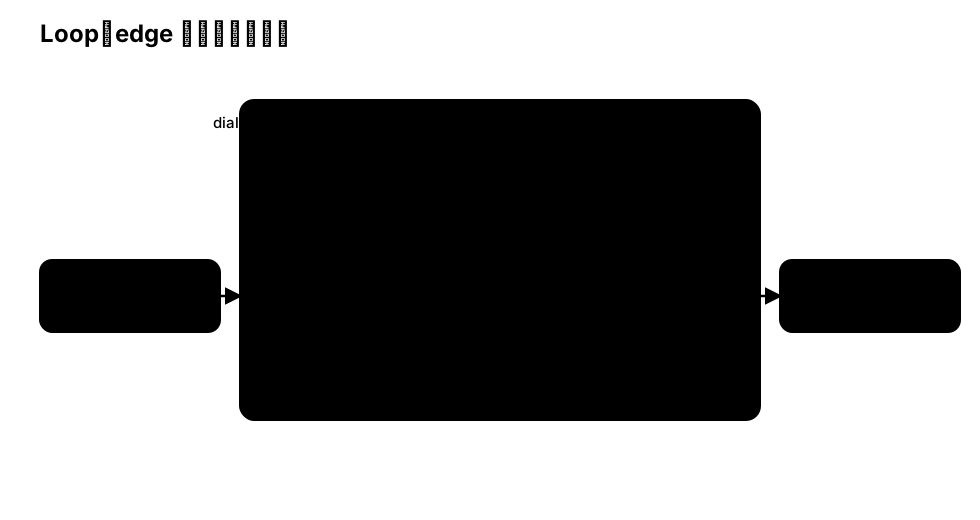
将 Step 1 的链路置于循环体内,得到一个支持多轮收敛的 Phase。
为了便于演示“水平消息传递”,本节仍以 Edge keys 作为字段契约,循环体内通过 assistant_response 与 instructor_guidance 往返迭代。
import os
from masfactory import RootGraph, Loop, Agent, OpenAIModel, HistoryMemory

model = OpenAIModel(
    model_name=os.getenv("MODEL", "gpt-4o-mini"),
    api_key=os.getenv("OPENAI_API_KEY"),
    base_url=os.getenv("BASE_URL"),
)

history = HistoryMemory(top_k=12)

g = RootGraph(name="p2_loop_edge_imp")

dialog = g.create_node(
    Loop,
    name="dialog",
    max_iterations=4,
    initial_messages={"assistant_response": "No assistant response yet."},
)

assistant = dialog.create_node(
    Agent,
    name="assistant",
    model=model,
    memories=[history],
    instructions="你是 Assistant。请基于用户需求与 Instructor 的指导完成任务。",
    prompt_template=(
        "【USER DEMAND】\n{user_demand}\n\n"
        "【INSTRUCTOR GUIDANCE】\n{instructor_guidance}\n\n"
    ),
)
instructor = dialog.create_node(
    Agent,
    name="instructor",
    model=model,
    memories=[history],
    instructions="你是 Instructor。阅读用户需求与上一轮 assistant_response,给出改进指导。",
    prompt_template=[
        "【USER DEMAND】\n{user_demand}\n\n",
        "【ASSISTANT RESPONSE】\n{assistant_response}\n\n",
    ],
)

dialog.edge_from_controller(instructor, {"user_demand": "用户需求", "assistant_response": "上一轮的Assistant响应"})
dialog.create_edge(instructor, assistant, {"instructor_guidance": "Instructor的指导意见"})
dialog.edge_to_controller(assistant, {"assistant_response": "Assistant的响应"})

g.edge_from_entry(dialog, {"user_demand": "用户需求"})
g.edge_to_exit(dialog, {"assistant_response": "Assistant的响应"})

g.build()
message = {"user_demand": "做一个猜数字小游戏"}
out, _attrs = g.invoke(message)
print(out["assistant_response"])
Step 3 Switch + pull/push:手动装配往返结构
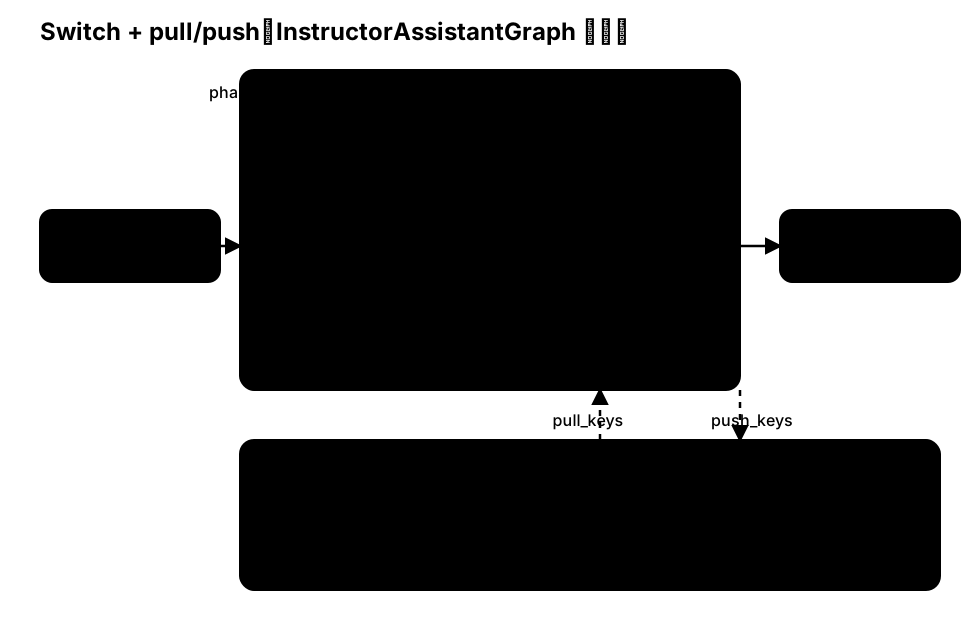
与声明式教程 Step 3 对齐:本节以“命令式装配”的方式手动创建一个由 Loop + LogicSwitch + 2 个 Agent 组成的往返结构。
在该结构中:
LogicSwitch根据current_iteration决定本轮路由到assistant或instructor;task / draft / plan作为垂直状态存放在RootGraph attributes中,通过pull_keys / push_keys在 Phase 内部读写;- 内部边仅承担控制流(keys 设为
{}),字段编排交由 attributes 管理。
import os
from masfactory import RootGraph, Loop, LogicSwitch, Agent, OpenAIModel, HistoryMemory

model = OpenAIModel(
    model_name=os.getenv("MODEL", "gpt-4o-mini"),
    api_key=os.getenv("OPENAI_API_KEY"),
    base_url=os.getenv("BASE_URL"),
)

history = HistoryMemory(top_k=12)

g = RootGraph(
    name="p3_switch_attr_imp",
    attributes={"task": "做一个猜数字小游戏", "draft": "", "plan": ""},
)

assistant_first = True

def to_assistant(messages: dict, attributes: dict) -> bool:
    i = int(attributes.get("current_iteration", 0))
    return (i % 2 == 1) if assistant_first else (i % 2 == 0)

def to_instructor(messages: dict, attributes: dict) -> bool:
    return not to_assistant(messages, attributes)

phase = g.create_node(
    Loop,
    name="phase",
    max_iterations=4,
    pull_keys={"task": "", "draft": "", "plan": ""},
    push_keys={"draft": "", "plan": ""},
)

switch = phase.create_node(
    LogicSwitch,
    name="switch",
    routes={"assistant": to_assistant, "instructor": to_instructor},
)
assistant = phase.create_node(
    Agent,
    name="assistant",
    model=model,
    memories=[history],
    instructions=(
        "你是 Assistant(CPO)。请在现有草案基础上补充改进。\n"
        "输出要求:仅输出 JSON,且必须包含字段:draft(str)。"
    ),
    prompt_template=[
        "【任务】\n{task}\n\n",
        "【当前草案】\n{draft}\n\n",
        "请更新 draft(字符串)。",
    ],
    pull_keys={"task": "", "draft": "", "plan": ""},
    push_keys={"draft": ""},
)
instructor = phase.create_node(
    Agent,
    name="instructor",
    model=model,
    memories=[history],
    instructions=(
        "你是 Instructor(CEO)。请审阅草案并给出可执行计划。\n"
        "输出要求:仅输出 JSON,且必须包含字段:plan(str)。必要时可同时输出 draft(str)。"
    ),
    prompt_template=[
        "【任务】\n{task}\n\n",
        "【草案】\n{draft}\n\n",
        "【当前计划】\n{plan}\n\n",
        "请更新 plan(字符串);必要时可同时修订 draft。",
    ],
    pull_keys={"task": "", "draft": "", "plan": ""},
    push_keys={"plan": "", "draft": ""},
)

# 内部边:仅承载控制流(keys = {})
phase.edge_from_controller(switch, {})
phase.create_edge(switch, assistant, {})
phase.create_edge(switch, instructor, {})
phase.edge_to_controller(assistant, {})
phase.edge_to_controller(instructor, {})

g.edge_from_entry(phase, {})
g.edge_to_exit(phase, {})

g.build()
_out, out_attrs = g.invoke({})
print(out_attrs["plan"])
Step 4 封装为复合组件:Phase(Instructor/Assistant 往返结构)
上一节我们以“命令式装配”的方式手动搭建了 Loop + LogicSwitch + 2 个 Agent 的往返结构。
当该结构需要在多个地方复用时,更合理的工程化做法是将其封装为复合组件(composed graph),使其对外表现为一个可复用的“原子节点”。
下面给出一个与仓库内置组件 masfactory/components/composed_graph/instructor_assistant_graph.py 同源的实现骨架:
为与声明式教程中的命名保持一致,我们在教程中将它命名为 Phase(它的语义与 InstructorAssistantGraph 等价)。
from __future__ import annotations

from masfactory import Agent, LogicSwitch, Loop, OpenAIModel, HistoryMemory
from masfactory.adapters.model import Model
from masfactory.core.node import Node
from masfactory.utils.hook import masf_hook


class Phase(Loop):
    """A reusable Instructor/Assistant alternating loop."""

    def __init__(
        self,
        name: str,
        model: Model,
        max_turns: int,
        phase_instructions: str,
        instructor_instructions: str,
        assistant_instructions: str,
        instructor_first: bool = True,
        pull_keys: dict | None = None,
        push_keys: dict | None = None,
        attributes: dict | None = None,
    ):
        if attributes is None:
            attributes = {}
        super().__init__(
            name=name,
            max_iterations=max_turns,
            pull_keys=pull_keys,
            push_keys=push_keys,
            attributes={**attributes, "phase_instructions": phase_instructions},
        )
        self._model = model
        self._instructor_instructions = instructor_instructions
        self._assistant_instructions = assistant_instructions
        self._instructor_first = instructor_first
        self._history = HistoryMemory(top_k=12)

    @masf_hook(Node.Hook.BUILD)
    def build(self):
        def to_instructor(_messages: dict, attributes: dict) -> bool:
            i = int(attributes.get("current_iteration", 0))
            return (i % 2 == 1) if self._instructor_first else (i % 2 == 0)

        def to_assistant(messages: dict, attributes: dict) -> bool:
            return not to_instructor(messages, attributes)

        switch = self.create_node(
            LogicSwitch,
            name="switch",
            routes={"assistant": to_assistant, "instructor": to_instructor},
        )

        assistant = self.create_node(
            Agent,
            name="assistant",
            model=self._model,
            memories=[self._history],
            instructions=self._assistant_instructions,
            pull_keys=self._pull_keys,
            push_keys=self._push_keys,
        )
        instructor = self.create_node(
            Agent,
            name="instructor",
            model=self._model,
            memories=[self._history],
            instructions=self._instructor_instructions,
            pull_keys=self._pull_keys,
            push_keys=self._push_keys,
        )

        # 内部边:仅承载控制流(keys = {})
        self.edge_from_controller(switch, {})
        self.create_edge(switch, assistant, {})
        self.create_edge(switch, instructor, {})
        self.edge_to_controller(assistant, {})
        self.edge_to_controller(instructor, {})

        super().build()


# 用法:Phase 对外表现为一个“可复用节点”
import os
from masfactory import RootGraph

model = OpenAIModel(
    model_name=os.getenv("MODEL", "gpt-4o-mini"),
    api_key=os.getenv("OPENAI_API_KEY"),
    base_url=os.getenv("BASE_URL"),
)
g = RootGraph(name="p4_phase_component", attributes={"task": "...", "draft": "", "plan": ""})
phase = g.create_node(
    Phase,
    name="phase",
    model=model,
    max_turns=4,
    phase_instructions="单阶段收敛:产出 draft 与 plan。",
    instructor_instructions="...",
    assistant_instructions="...",
    pull_keys={"task": "", "draft": "", "plan": ""},
    push_keys={"draft": "", "plan": ""},
)
g.edge_from_entry(phase, {})
g.edge_to_exit(phase, {})
g.build()
提示
在真实工程中,你通常不需要自己实现上面的 Phase:MASFactory 已经内置了等价组件 InstructorAssistantGraph。
下一节将直接使用该内置组件,继续完成 ChatDev Lite 的复现。
Step 5 使用内置复合组件:InstructorAssistantGraph
上面的手动装配展示了 Instructor/Assistant 往返结构的关键要素(Loop、Switch、pull/push)。
在实际工程中,仓库内置了等价的复合组件 InstructorAssistantGraph,用于复用该结构并降低装配成本。接下来我们用它作为 Phase 的基础单元,继续复现 ChatDev Lite。
import os
from masfactory import RootGraph, InstructorAssistantGraph, OpenAIModel

model = OpenAIModel(
    model_name=os.getenv("MODEL", "gpt-4o-mini"),
    api_key=os.getenv("OPENAI_API_KEY"),
    base_url=os.getenv("BASE_URL"),
)

g = RootGraph(
    name="p4_iagraph_imp",
    attributes={"task": "做一个猜数字小游戏", "draft": "", "plan": ""},
)

phase = g.create_node(
    InstructorAssistantGraph,
    name="phase",
    model=model,
    max_turns=4,
    instructor_role_name="Instructor",
    assistant_role_name="Assistant",
    phase_instructions="单阶段收敛:产出 draft 与 plan。",
    instructor_instructions=(
        "你是 Instructor(CEO)。请审阅草案并给出可执行计划。\n"
        "输出要求:仅输出 JSON,且必须包含字段:plan(str)。必要时可同时输出 draft(str)。"
    ),
    assistant_instructions=(
        "你是 Assistant(CPO)。请在现有草案基础上补充改进。\n"
        "输出要求:仅输出 JSON,且必须包含字段:draft(str)。"
    ),
    assistant_prompt_template=[
        "【任务】\n{task}\n\n",
        "【当前草案】\n{draft}\n\n",
        "请更新 draft(字符串)。",
    ],
    instructor_prompt_template=[
        "【任务】\n{task}\n\n",
        "【草案】\n{draft}\n\n",
        "【当前计划】\n{plan}\n\n",
        "请更新 plan(字符串);必要时可同时修订 draft。",
    ],
    pull_keys={"task": "", "draft": "", "plan": ""},
    push_keys={"draft": "", "plan": ""},
    # 内部边仅承担控制流:避免在 in/out edge 上做字段编排。
    assistant_in_keys={},
    assistant_out_keys={},
    instructor_in_keys={},
    instructor_out_keys={},
)

g.edge_from_entry(phase, {})
g.edge_to_exit(phase, {})

g.build()
_out, out_attrs = g.invoke({})
print(out_attrs["plan"])
Step 6 用 InstructorAssistantGraph 组装 6 个 Phase(简化版 ChatDev Lite)
目标结构:
ENTRY → demand_analysis → language_choose → coding → code_complete → coding_test → manual → EXIT
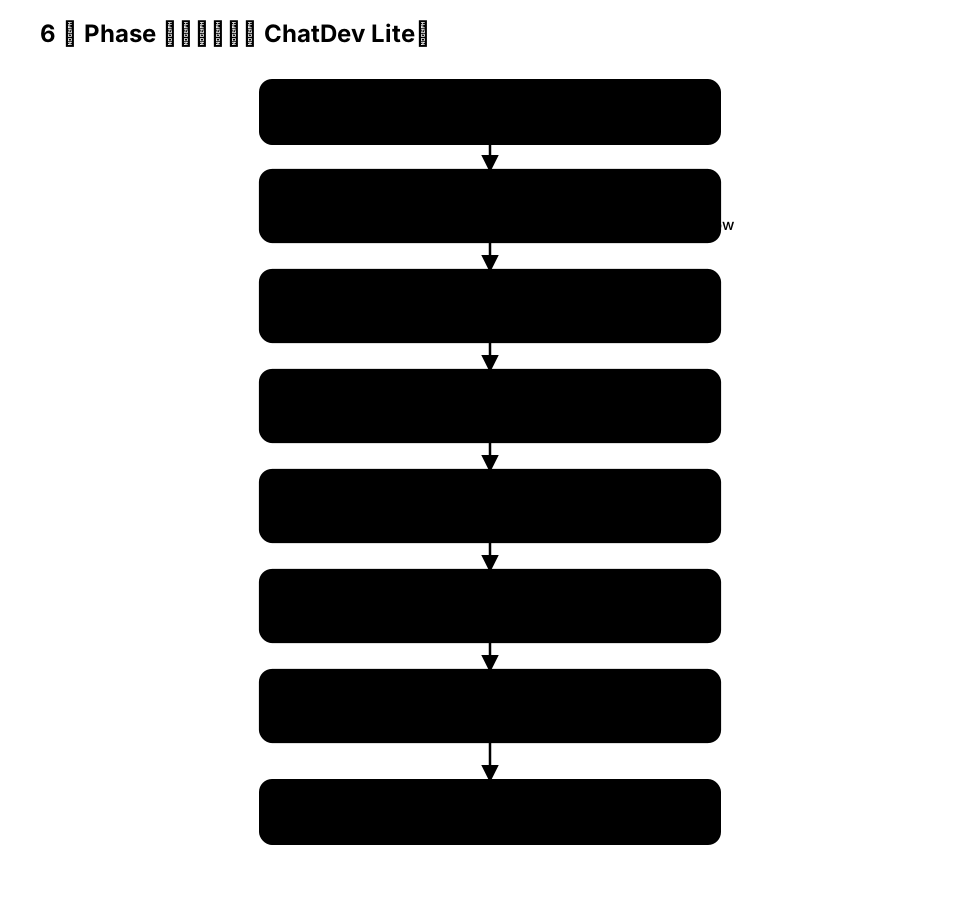
下面给出一个更贴近仓库 applications/chatdev_lite 的写法:直接复用其 Role/Phase prompt 配置,并将 phase 的状态放入 RootGraph attributes(通过 pull/push 完成阶段间的状态传递)。
这样做的好处是:你可以在保持“命令式装配”的同时,尽量复用工程版 prompt 的结构与字段约定。
import json
import os
from pathlib import Path

from masfactory import RootGraph, InstructorAssistantGraph, OpenAIModel

# 1) 读取 ChatDev Lite 的工程 prompt(仓库内)
CONFIG_DIR = Path("applications/chatdev_lite/assets/config")
role_config = json.loads((CONFIG_DIR / "RoleConfig.json").read_text(encoding="utf-8"))
phase_config = json.loads((CONFIG_DIR / "PhaseConfig.json").read_text(encoding="utf-8"))
chat_chain_config = json.loads((CONFIG_DIR / "ChatChainConfig.json").read_text(encoding="utf-8"))

def join_lines(v: list[str] | str | None) -> str:
    if v is None:
        return ""
    if isinstance(v, list):
        return "\n".join(v)
    return str(v)

model = OpenAIModel(
    model_name=os.getenv("MODEL", "gpt-4o-mini"),
    api_key=os.getenv("OPENAI_API_KEY"),
    base_url=os.getenv("BASE_URL"),
)

# 2) RootGraph attributes:阶段共享状态(示例给出最小可用子集)
attrs = {
    "task": "Develop a basic Gomoku game.",
    "chatdev_prompt": chat_chain_config.get("background_prompt", ""),
    "description": "",
    "ideas": "",
    "modality": "",
    "language": "",
    "codes": [],
    "unimplemented_file": "",
    "exist_bugs_flag": True,
    "test_reports": "",
    "error_summary": "",
    "requirements": "",
    "manual": "",
}

g = RootGraph(name="chatdev_lite_simplified_imp", attributes=attrs)

def add_phase(*, node_name: str, phase_key: str, max_turns: int = 3):
    spec = phase_config[phase_key]
    assistant_role = spec["assistant_role_name"]
    instructor_role = spec["user_role_name"]  # 配置文件中的命名

    assistant_instructions = join_lines(role_config[assistant_role])
    instructor_instructions = join_lines(role_config[instructor_role])

    phase_instructions = join_lines(spec["phase_prompt"])
    tool_instruction = join_lines(spec.get("tool_instruction"))
    if tool_instruction:
        # 工程版做法:把 tool instruction 作为前置约束拼入指令
        assistant_instructions = tool_instruction + "\n" + assistant_instructions

    # pull/push:让 phase 在 RootGraph attributes 上读写状态(阶段间不依赖 edge 消息)
    # 说明:这里的 key 列表参考 applications/chatdev_lite/components/lite_phase.py 的定义。
    phase_pull = {
        "task": "",
        "description": "",
        "ideas": "",
        "modality": "",
        "language": "",
        "codes": "",
        "unimplemented_file": "",
        "exist_bugs_flag": "",
        "test_reports": "",
        "error_summary": "",
        "requirements": "",
        "manual": "",
        "chatdev_prompt": "",
        "gui": "",
        "directory": "",
    }
    phase_push = {
        "modality": "",
        "language": "",
        "codes": "",
        "unimplemented_file": "",
        "test_reports": "",
        "error_summary": "",
        "requirements": "",
        "manual": "",
    }

    return g.create_node(
        InstructorAssistantGraph,
        name=node_name,
        model=model,
        max_turns=max_turns,
        instructor_role_name=instructor_role,
        instructor_instructions=instructor_instructions,
        assistant_role_name=assistant_role,
        assistant_instructions=assistant_instructions,
        phase_instructions=phase_instructions,
        pull_keys=phase_pull,
        push_keys=phase_push,
    )

# 3) 6 个 Phase 串联(简化版)
demand = add_phase(node_name="demand_analysis", phase_key="DemandAnalysis", max_turns=3)
lang = add_phase(node_name="language_choose", phase_key="LanguageChoose", max_turns=3)
coding = add_phase(node_name="coding", phase_key="Coding", max_turns=1)
complete = add_phase(node_name="code_complete", phase_key="CodeComplete", max_turns=3)
test = add_phase(node_name="coding_test", phase_key="TestErrorSummary", max_turns=1)
manual = add_phase(node_name="manual", phase_key="Manual", max_turns=1)

# 边:仅承担控制流;状态通过 attributes 在 phase 之间传递
g.edge_from_entry(demand, {})
g.create_edge(demand, lang, {})
g.create_edge(lang, coding, {})
g.create_edge(coding, complete, {})
g.create_edge(complete, test, {})
g.create_edge(test, manual, {})
g.edge_to_exit(manual, {})

g.build()
out, out_attrs = g.invoke({})
print("done, manual bytes:", len(str(out_attrs.get("manual", ""))))
说明
- 本章旨在方便用户快速学习MASFactory的命令式开发范式,因此省略了
ChatDev的部分实现细节,如果想了解完整的实现细节,可以参考完整复现版ChatDev-Lite 或 ChatDev。