

声明式构建 ChatDev Lite
本教程用声明式方式从 0 装配一个简化版 ChatDev Lite,并刻意采用“循序渐进”的组织方式:每一步只引入一个新概念,其余配置尽量保持不变,便于读者对照理解。
- 理解 Graph / Node / Edge 如何表达工作流结构;
- 以两个固定角色的
Agent(Assistant/Instructor)为基础,逐步改进出可复用的 Phase(ChatDev中把由Assistant和Instructor组成的对话过程称为一个Phase); - 从“水平消息(Edge 传参)”逐步过渡到“垂直状态(attributes + pull/push)”;
- 利用
NodeTemplate与template_overrides_for()复用同一份结构,在不编写复合组件类的前提下装配 6 个 Phase。
约定:本页示例使用一个统一的消息载体
workspace(Pythondict),用于在节点之间传递与累积中间产物。
在 Step 1~Step 3 中,Assistant/Instructor的提示词结构与输出字段保持一致;递进变化主要来自“图结构如何装配”。
Step 1 连接一个由两个Agent组成的Graph
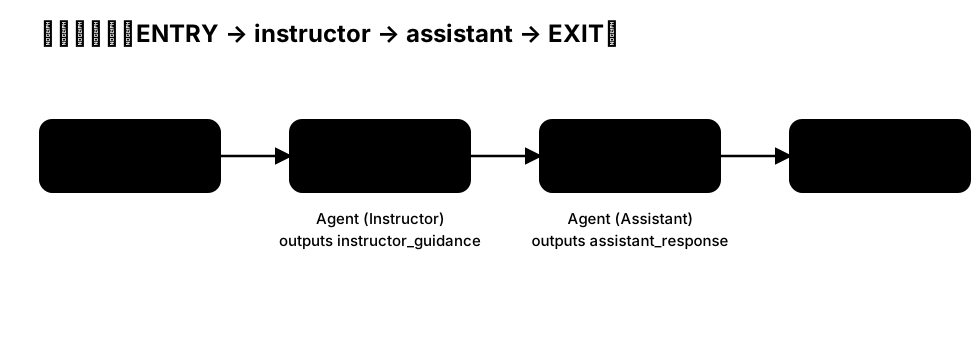
先从一个最小的 Phase 开始:ENTRY → instructor → assistant → EXIT。
在该结构中,Assistant 负责产出草案,Instructor 负责审阅并收敛到可执行结果。
import os
from masfactory import RootGraph, Agent, OpenAIModel, NodeTemplate, HistoryMemory

# 1) 构建模型适配器(以 OpenAI API 为例)
model = OpenAIModel(
    model_name=os.getenv("MODEL", "gpt-4o-mini"),
    api_key=os.getenv("OPENAI_API_KEY"),
    base_url=os.getenv("BASE_URL"),
)

history = HistoryMemory(top_k=12)

# 2) 声明两个节点模板(NodeTemplate)

Instructor = NodeTemplate(
    Agent,
    model=model,
    memories=[history],
    instructions=(
        "你是 Instructor,你在指导 Assistant 按照用户需求来完成任务。阅读用户的需求,并指导 Assistant。\n"
    ),
    prompt_template=(
        "【USER DEMAND】\n{user_demand}\n\n"
    ),
)
Assistant = NodeTemplate(
    Agent,
    model=model,
    memories=[history],
    instructions=(
        "你是 Assistant。 请给予用户需求和Instructor的指导来完成任务。\n"
    ),
    prompt_template=(
        "【USER DEMAND】\n{user_demand}\n\n"
        "【INSTRUCTOR GUIDANCE】\n{instructor_guidance}\n\n"
    ),
)


# 3) 用 nodes/edges 装配结构:ENTRY → instructor → assistant → EXIT
#    注意:Edge 的 key 定义了消息字段契约;`Agent.output_keys` 会从出边汇总而来。
g = RootGraph(
    name="p1_workflow_decl",
    nodes=[
        ("assistant", Assistant),
        ("instructor", Instructor),
    ],
    edges=[
        ("ENTRY", "instructor", {"user_demand": "用户需求"}),
        ("instructor", "assistant", {"instructor_guidance": "Instructor的指导意见"}),
        ("assistant", "EXIT", {"assistant_response": "Assistant的响应"}),
    ],
)

g.build()
message = {"user_demand": "做一个猜数字小游戏"}
out, _attrs = g.invoke(message)
print(out["assistant_response"])
Step 2 使用 Loop 实现多轮协作(Edge 消息)
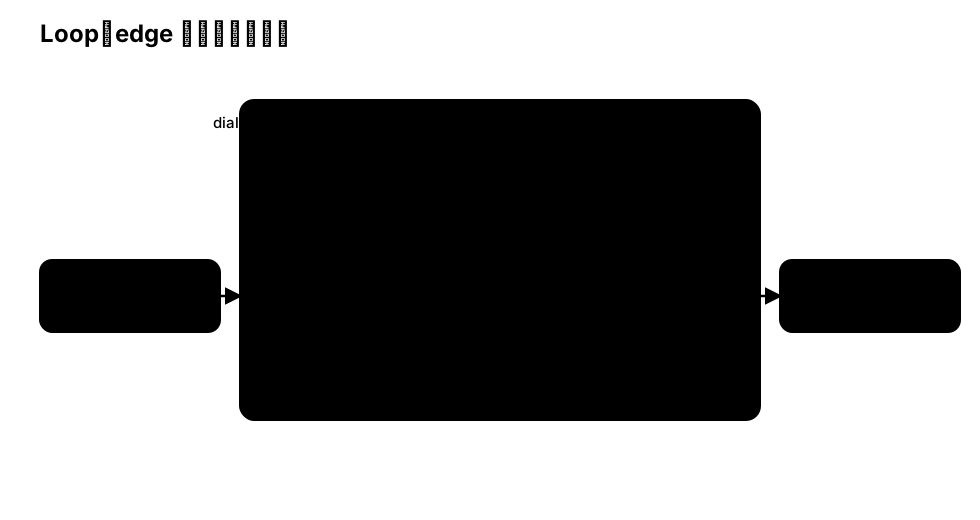
Step 1 的 Phase 仅执行一次。实际场景中,一个 Phase 往往需要多轮往返以逐步收敛方案。
此处引入 Loop:将 Assistant → Instructor 的链路置于循环体内,通过 Edge 在每一轮传递 workspace。
import os
from masfactory import RootGraph, Loop, Agent, OpenAIModel, NodeTemplate, HistoryMemory

model = OpenAIModel(
    model_name=os.getenv("MODEL", "gpt-4o-mini"),
    api_key=os.getenv("OPENAI_API_KEY"),
    base_url=os.getenv("BASE_URL"),
)

history = HistoryMemory(top_k=12)

Instructor = NodeTemplate(
    Agent,
    model=model,
    memories=[history],
    instructions=(
        "你是 Instructor,你在指导 Assistant 按照用户需求来完成任务。阅读用户的需求,以及上一轮次中的Assistant的响应,给Assistant提出改进意见。\n"
    ),
    prompt_template=(
        "【USER DEMAND】\n{user_demand}\n\n",
        "【ASSISTANT RESPONSE】\n{assistant_response}\n\n",
    ),
)
Assistant = NodeTemplate(
    Agent,
    model=model,
    memories=[history],
    instructions=(
        "你是 Assistant。 请给予用户需求和Instructor的指导来完成任务。\n"
    ),
    prompt_template=(
        "【USER DEMAND】\n{user_demand}\n\n"
        "【INSTRUCTOR GUIDANCE】\n{instructor_guidance}\n\n"
    ),
)

DialogLoop = NodeTemplate(
    Loop,
    max_iterations=4,
    nodes=[
        ("assistant", Assistant),
        ("instructor", Instructor),
    ],
    edges=[
        # Loop 没有 ENTRY/EXIT,而以 CONTROLLER 作为循环调度入口。
        ("CONTROLLER", "instructor", {"user_demand": "用户需求", "assistant_response": "上一轮的Assistant的响应"}),
        ("instructor", "assistant", {"instructor_guidance": "Instructor的指导意见"}),
        ("assistant", "CONTROLLER", {"assistant_response": "Assistant的响应"}),
    ],
    initial_message={"assistant_response": "No assistant response yet."},   # 第一轮 instructor 发言时,还没有 assistant 的响应,所以要给 assistant_response 设定一个默认值避免出错。
)

g = RootGraph(
    name="p2_loop_edge_decl",
    nodes=[("dialog", DialogLoop)],
    edges=[
        ("ENTRY", "dialog", {"user_demand": "用户需求"}),
        ("dialog", "EXIT", {"assistant_response": ""}),
    ],
)

g.build()
message = {"user_demand": "做一个猜数字小游戏"}
out, _attrs = g.invoke(message)
print(out["assistant_response"])
Step 3 Switch + pull/push:装配 InstructorAssistantGraph 的核心结构
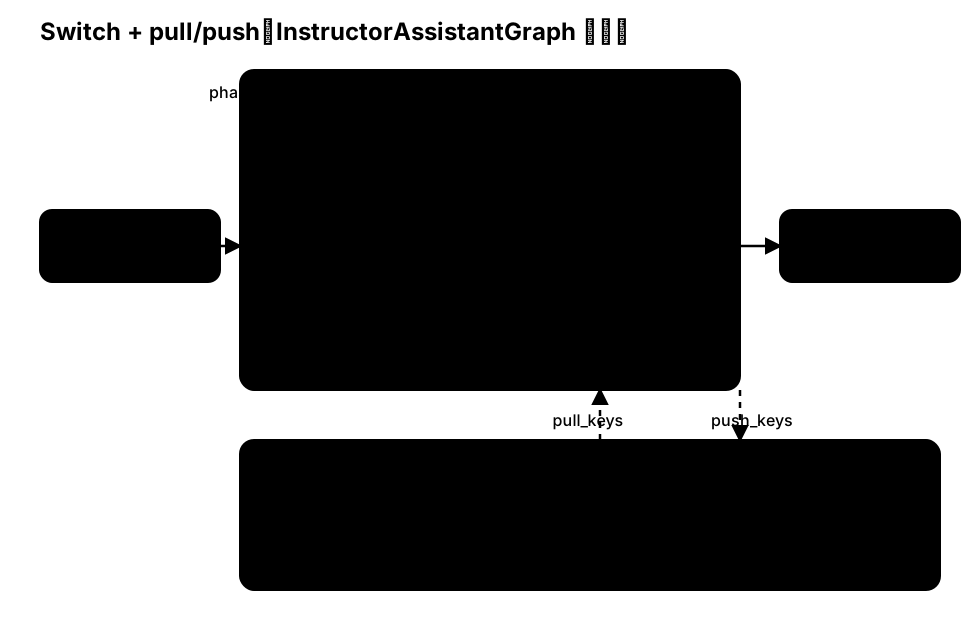
Step 2 的循环体是“固定顺序”的:每轮总是 Instructor → Assistant。
而在Step 2 中我们发现一个问题,Step 2 中 Instructor 充当了一个提出改进意见的角色,但是第一轮次Instructor先发言,但是 Assistant 还没有给出 assistant_response,所以第一轮次 Instructor 实际上是轮空的。 我们当然可以手动调整Edge的连接,让Assistant第一个发言,但是在面对Step 1中 Instructor 充当跟进用户需求的角色,需要 Instructor 先发言。所以我们需要一个更通用的设计来自由决定先发言的Agent。
此外,在前面的设计中,几乎每个节点(Controller、assistant、instructor)都需要对assistant_response 字段进行处理,这时如果使用Edge传参将会增加额外的工作量。
因此我们引入:
LogicSwitch:根据条件选择本轮路由到哪个节点;pull_keys / push_keys:将关键字段(如task/draft/plan)作为垂直状态在 Loop 内部与外部同步。
import os
from masfactory import RootGraph, Loop, LogicSwitch, Agent, OpenAIModel, NodeTemplate, HistoryMemory

model = OpenAIModel(
    model_name=os.getenv("MODEL", "gpt-4o-mini"),
    api_key=os.getenv("OPENAI_API_KEY"),
    base_url=os.getenv("BASE_URL"),
)

history = HistoryMemory(top_k=12)

assistant_first = True  # 使用一个超参数决定发言顺序

# LogicSwitch 通过condition函数决定路由方向
# condition函数接受两个参数:messages 和 attributes
# messages 是通过 in_edges 传入LogicSwitch的字段的引用
# attributes 是LogicSwitch 通过 pull_key 从 Loop 中提取的字段的引用。
def to_assistant(messages: dict, attributes: dict) -> bool:
    # Loop.Controller 每轮会把 current_iteration 写入 attributes(从 1 开始)。
    i = int(attributes.get("current_iteration", 0))
    return (i % 2 == 1) if assistant_first else (i % 2 == 0)

def to_instructor(messages: dict, attributes: dict) -> bool:
    return not to_assistant(messages, attributes)

Switch = NodeTemplate(LogicSwitch, routes={"assistant": to_assistant, "instructor": to_instructor})

Assistant = NodeTemplate(
    Agent,
    model=model,
    memories=[history],
    instructions=(
        "你是 Assistant(CPO)。请在现有草案基础上补充改进。\n"
    ),
    prompt_template=[
        "【任务】\n{task}\n\n",
        "【当前草案】\n{draft}\n\n",
    ],
    pull_keys={"task": "", "draft": "", "plan": ""},
    push_keys={"draft": "你的草案"},
)
Instructor = NodeTemplate(
    Agent,
    model=model,
    memories=[history],
    instructions=(
        "你是 Instructor(CEO)。请审阅草案并给出可执行计划。\n"
    ),
    prompt_template=[
        "【任务】\n{task}\n\n",
        "【草案】\n{draft}\n\n",
        "【当前计划】\n{plan}\n\n",
    ],
    pull_keys={"task": "", "draft": "", "plan": ""},
    push_keys={"plan": "你的计划"},
)

Phase = NodeTemplate(
    Loop,
    max_iterations=4,
    pull_keys={"task": "", "draft": "", "plan": ""},
    push_keys={"draft": "", "plan": ""},
    nodes=[
        ("switch", Switch),
        ("assistant", Assistant),
        ("instructor", Instructor),
    ],
    edges=[
        ("CONTROLLER", "switch", {}),
        ("switch", "assistant", {}),
        ("switch", "instructor", {}),
        ("assistant", "CONTROLLER", {}),
        ("instructor", "CONTROLLER", {}),
    ],
)

g = RootGraph(
    name="p3_switch_attr_decl",
    attributes={"task": "做一个猜数字小游戏", "draft": "", "plan": ""},
    nodes=[("phase", Phase)],
    edges=[
        ("ENTRY", "phase", {}),
        ("phase", "EXIT", {}),
    ],
)

g.build()
_out, out_attrs = g.invoke({})
print(out_attrs["plan"])
到此为止,我们已经得到一个“可配置的 Instructor/Assistant 往返结构”。
接下来,我们复用该结构装配多个 Phase。
Step 4 复用 Phase
在ChatDev中,"Phase" 不仅仅是一个往返对话结构,它作为一个可复用的阶段,需要携带该阶段的目标与约束。
下面我们引入一个独立字段 phase_instructions,并将 Step 3 中的阶段状态字段(例如 task / draft / plan)作为显式字段在 Phase 内部同步,而不是将所有中间产物封装到单一的 workspace 中。这样做有两个直接收益:其一,字段契约更清晰;其二,跨 Phase 串联时,状态的拉取与回写更易维护。
import os
from masfactory import Loop, LogicSwitch, Agent, OpenAIModel, NodeTemplate, HistoryMemory

model = OpenAIModel(
    model_name=os.getenv("MODEL", "gpt-4o-mini"),
    api_key=os.getenv("OPENAI_API_KEY"),
    base_url=os.getenv("BASE_URL"),
)

history = HistoryMemory(top_k=12)

assistant_first = True

def to_assistant(messages: dict, attributes: dict) -> bool:
    i = int(attributes.get("current_iteration", 0))
    return (i % 2 == 1) if assistant_first else (i % 2 == 0)

def to_instructor(messages: dict, attributes: dict) -> bool:
    return not to_assistant(messages, attributes)

Switch = NodeTemplate(LogicSwitch, routes={"assistant": to_assistant, "instructor": to_instructor})

Assistant = NodeTemplate(
    Agent,
    model=model,
    memories=[history],
    instructions="你是 Assistant(CPO)。请补充/改进草案,并仅输出需要更新的字段(JSON)。",
    prompt_template=[
        "【阶段目标】\n{phase_instructions}\n",        # 通过 pull_keys 指定使用该字段,运行时Agent从Loop的Attributes获取该字段的值
        "【任务】\n{task}\n\n",
        "【当前草案】\n{draft}\n\n",
        "请更新/补充 draft(字符串)。",
    ],
    pull_keys={"phase_instructions": "", "task": "", "draft": "", "plan": ""},
    push_keys={"draft": "你的草案"},
)
Instructor = NodeTemplate(
    Agent,
    model=model,
    memories=[history],
    instructions="你是 Instructor(CEO)。请审阅草案并产出计划,并仅输出需要更新的字段(JSON)。",
    prompt_template=[
        "【阶段目标】\n{phase_instructions}\n",
        "【任务】\n{task}\n\n",
        "【草案】\n{draft}\n\n",
        "【当前计划】\n{plan}\n\n",
        "请更新/补充 plan(字符串);必要时可同时修订 draft。",
    ],
    pull_keys={"phase_instructions": "", "task": "", "draft": "", "plan": ""},
    push_keys={"plan": "你的计划"},
)

Phase = NodeTemplate(
    Loop,
    max_iterations=3,
    pull_keys={"task": "", "draft": "", "plan": ""},
    push_keys={"draft": "", "plan": ""},
    attributes={"phase_instructions": ""},
    nodes=[("switch", Switch), ("assistant", Assistant), ("instructor", Instructor)],
    edges=[
        ("CONTROLLER", "switch", {}),
        ("switch", "assistant", {}),
        ("switch", "instructor", {}),
        ("assistant", "CONTROLLER", {}),
        ("instructor", "CONTROLLER", {}),
    ],
)

# 现在 Phase 作为 NodeTemplate 已经具备“可复用的结构蓝图”能力。
Demand = Phase(attributes={"phase_instructions": "Demand analysis:明确目标与约束。"})
Language = Phase(attributes={"phase_instructions": "Language choosing:确定实现语言与主要依赖。"})上面这段写法通过“派生模板”(Demand = Phase(...))复用结构;当 Phase 数量较多时,也可以使用 template_overrides_for() 以“按名称覆写”的方式集中管理。
Step 5: 更深入地复用NodeTemplate
Step 4 的“派生模板”(Demand = Phase(...))能够复用结构,并覆写 Phase 本级参数(例如 Phase.pull_keys)。
但它无法直接覆写 Phase 内部节点(例如 Instructor 的 instructions)。要实现“跨层级复用”,需要借助 NodeTemplate 的“装配期覆写”机制。 而对于ChatDev而言,不同Phase的Instructor和Assistant只是协作结构相同,其角色扮演和指令、输入输出字段均有所不同,所以我们需要更深一步地复用。
更完整的规则、优先级与可运行示例见开发指南:NodeTemplate。
MASFactory 提供 4 个 template 作用域函数,用于在 build/装配阶段 统一注入或覆写 NodeTemplate 的 kwargs:
template_defaults(**kwargs):全局“填空”默认值(仅当模板未显式提供该参数时才生效)。template_overrides(**kwargs):全局“强制覆写”(无论模板是否显式提供都会覆盖)。template_defaults_for(selector...):对匹配的模板“填空”(按 name/type 选择)。template_overrides_for(selector...):对匹配的模板“强制覆写”(按 name/type 选择,可配合path_filter限定路径)。
接下来,我们使用 template_overrides_for() 在装配期(build阶段)对NodeTemplate的内部节点的参数进行覆写。
from masfactory import Agent, Loop, template_defaults_for, template_overrides_for

# 注意:这些覆写在“模板物化(materialize)”时生效,因此应包裹 g.build()。
with (
    # 例 1:对所有 Agent 填充一个默认开关(若模板未显式设置)
    template_defaults_for(type_filter=Agent, hide_unused_fields=True),
    # 例 2:对 Phase 内部名为 "instructor" 的 Agent 强制覆写指令(用 path_filter 精确限定到某个 Phase)
    template_overrides_for(
        type_filter=Agent,                         # 选择所有 Agent 类型的节点
        name_filter="instructor",                  # 选择所有名为 instructor 的子节点
        path_filter="demand_analysis>instructor",  # path 选择器可以按照层级选择节点,使用 '>' 作为分隔符。demand_analysis>instructor  表示 选择名为 demand_analysis 的图节点下的名为 instructor 节点。
        instructions="你是 Instructor(CEO)。请以更严格的标准审阅方案,并补齐关键风险与约束。", # 覆写 demand_analysis 节点的 instructor 节点的 instructions 参数
    ),
    # 例 3:对某个具体 Phase(它本身是 Loop)覆写阶段目标
    template_overrides_for(
        type_filter=Loop,
        name_filter="demand_analysis", # 覆写 demand_analysis 节点的 phase_instructions 参数
        attributes={"phase_instructions": "Demand analysis:明确目标与约束,并给出可验证的验收标准。"}, # 覆写 demand_analysis 节点的 phase_instructions 参数
    ),
):
    g.build()
注意
- path_filter 选择器可以按照层级选择节点,使用 '>' 作为分隔符。demand_analysis>instructor 表示 选择名为 demand_analysis 的图节点下的名为 instructor 节点。
- 上面的例子中,我们每个选择器都同时使用了type_filter、name_filter和path_filter。事实上前两者是多余的,之所以这样演示是为了说明template_overrides_for的多种选择器的用法。
Step 6 串联 6 个 Phase 组成简化版的ChatDev
目标结构:
ENTRY → demand_analysis → language_choose → coding → code_complete → coding_test → manual → EXIT
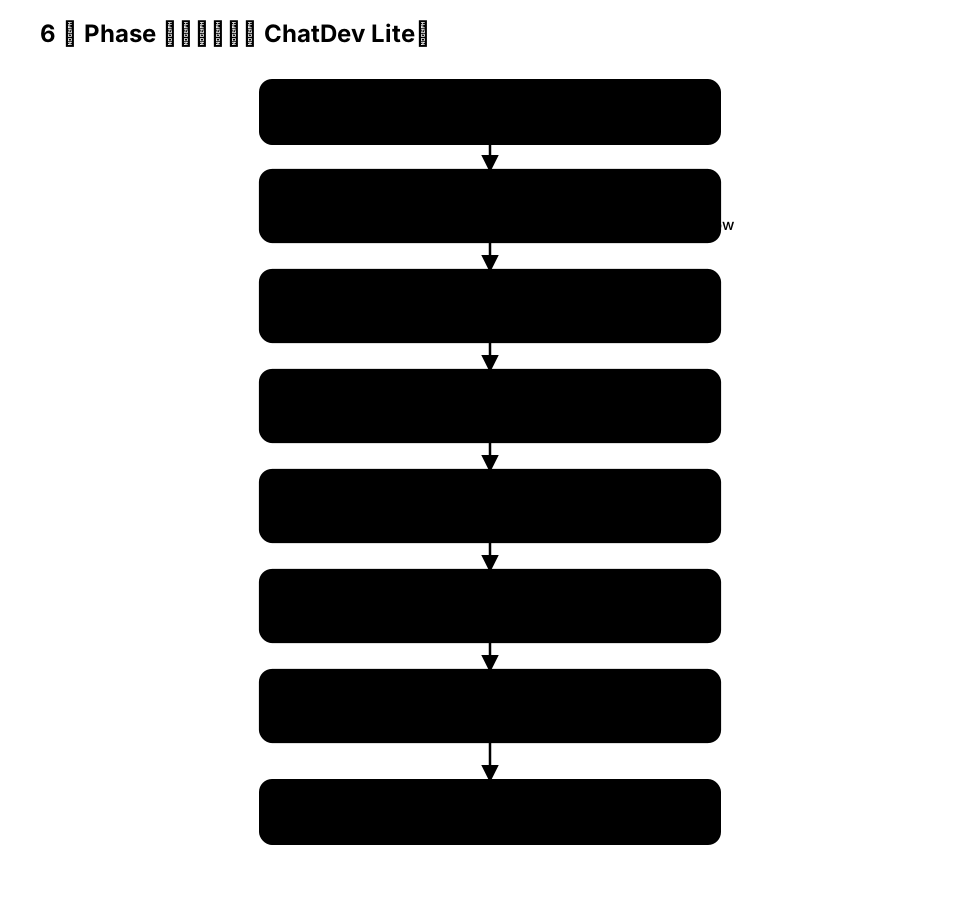
在这一步我们使用原版的提示词装配6个Phase,完成ChatDev Lite的构建。
注意
- 由于原版提示词过于冗长,这里只展示代码部分,有关prompts文件可以到OpenBMB/ChatDev github仓库或者 MASFactory 仓库中下载。
import json
import os
from pathlib import Path
from contextlib import ExitStack

from masfactory import (
    RootGraph,
    Agent,
    LogicSwitch,
    Loop,
    OpenAIModel,
    NodeTemplate,
    HistoryMemory,
    template_overrides_for,
)

model = OpenAIModel(
    model_name=os.getenv("MODEL", "gpt-4o-mini"),
    api_key=os.getenv("OPENAI_API_KEY"),
    base_url=os.getenv("BASE_URL"),
)

history = HistoryMemory(top_k=12)

# 1) 读取 ChatDev Lite 的工程 prompt(仓库内)
CONFIG_DIR = Path("applications/chatdev_lite/assets/config")
role_config = json.loads((CONFIG_DIR / "RoleConfig.json").read_text(encoding="utf-8"))
phase_config = json.loads((CONFIG_DIR / "PhaseConfig.json").read_text(encoding="utf-8"))
chat_chain_config = json.loads((CONFIG_DIR / "ChatChainConfig.json").read_text(encoding="utf-8"))

def join_lines(v: list[str] | str | None) -> str:
    if v is None:
        return ""
    if isinstance(v, list):
        return "\n".join(v)
    return str(v)

# 2) RootGraph attributes:阶段共享状态(示例给出最小可用子集)
attrs = {
    "task": "Develop a basic Gomoku game.",
    "chatdev_prompt": chat_chain_config.get("background_prompt", ""),
    "description": "",
    "ideas": "",
    "modality": "",
    "language": "",
    "codes": [],
    "unimplemented_file": "",
    "exist_bugs_flag": True,
    "test_reports": "",
    "error_summary": "",
    "requirements": "",
    "manual": "",
}

# 3) Phase 共享的 pull/push(阶段间不依赖 edge 消息)
phase_pull = {
    "task": "",
    "description": "",
    "ideas": "",
    "modality": "",
    "language": "",
    "codes": "",
    "unimplemented_file": "",
    "exist_bugs_flag": "",
    "test_reports": "",
    "error_summary": "",
    "requirements": "",
    "manual": "",
    "chatdev_prompt": "",
    "gui": "",
    "directory": "",
}
phase_push = {
    "modality": "",
    "language": "",
    "codes": "",
    "unimplemented_file": "",
    "test_reports": "",
    "error_summary": "",
    "requirements": "",
    "manual": "",
}

# 4) Phase 结构模板:复用前面已经装配好的“Loop + Switch + pull/push”的 Phase 蓝图
#    (此处不使用内置的 InstructorAssistantGraph,而是直接使用 NodeTemplate 装配 Phase 结构。)
assistant_first = False  # ChatDev Lite 更符合“instructor → assistant”的顺序

def to_assistant(messages: dict, attributes: dict) -> bool:
    i = int(attributes.get("current_iteration", 0))
    return (i % 2 == 1) if assistant_first else (i % 2 == 0)

def to_instructor(messages: dict, attributes: dict) -> bool:
    return not to_assistant(messages, attributes)

Switch = NodeTemplate(LogicSwitch, routes={"assistant": to_assistant, "instructor": to_instructor})

Assistant = NodeTemplate(
    Agent,
    model=model,
    memories=[history],
    instructions="",
    prompt_template=[
        "{chatdev_prompt}\n\n",
        "【阶段目标】\n{phase_instructions}\n\n",
        "【任务】\n{task}\n\n",
        "请根据当前状态更新必要字段,并仅输出需要更新的字段(JSON)。",
    ],
    pull_keys={**phase_pull, "phase_instructions": ""},
    push_keys=phase_push,
)
Instructor = NodeTemplate(
    Agent,
    model=model,
    memories=[history],
    instructions="",
    prompt_template=[
        "{chatdev_prompt}\n\n",
        "【阶段目标】\n{phase_instructions}\n\n",
        "【任务】\n{task}\n\n",
        "请给出本阶段的指导与约束,并仅输出需要更新的字段(JSON)。",
    ],
    pull_keys={**phase_pull, "phase_instructions": ""},
    push_keys=phase_push,
)

Phase = NodeTemplate(
    Loop,
    max_iterations=2,  # 将在 build 时按节点名覆写(max_iterations = max_turns * 2)
    pull_keys=phase_pull,
    push_keys=phase_push,
    attributes={"phase_instructions": ""},
    nodes=[
        ("switch", Switch),
        ("assistant", Assistant),
        ("instructor", Instructor),
    ],
    edges=[
        ("CONTROLLER", "switch", {}),
        ("switch", "assistant", {}),
        ("switch", "instructor", {}),
        ("assistant", "CONTROLLER", {}),
        ("instructor", "CONTROLLER", {}),
    ],
)

g = RootGraph(
    name="chatdev_lite_simplified_decl_v2",
    attributes=attrs,
    nodes=[
        ("demand_analysis", Phase),
        ("language_choose", Phase),
        ("coding", Phase),
        ("code_complete", Phase),
        ("coding_test", Phase),
        ("manual", Phase),
    ],
    edges=[
        ("ENTRY", "demand_analysis", {}),
        ("demand_analysis", "language_choose", {}),
        ("language_choose", "coding", {}),
        ("coding", "code_complete", {}),
        ("code_complete", "coding_test", {}),
        ("coding_test", "manual", {}),
        ("manual", "EXIT", {}),
    ],
)

phase_plan = [
    ("demand_analysis", "DemandAnalysis", 3),
    ("language_choose", "LanguageChoose", 3),
    ("coding", "Coding", 1),
    ("code_complete", "CodeComplete", 3),
    ("coding_test", "TestErrorSummary", 1),
    ("manual", "Manual", 1),
]

with ExitStack() as stack:
    for node_name, phase_key, max_turns in phase_plan:
        spec = phase_config[phase_key]
        assistant_role = spec["assistant_role_name"]
        instructor_role = spec["user_role_name"]

        assistant_instructions = join_lines(role_config[assistant_role])
        instructor_instructions = join_lines(role_config[instructor_role])
        phase_instructions = join_lines(spec["phase_prompt"])

        stack.enter_context(
            template_overrides_for(
                type_filter=Loop,
                name_filter=node_name,
                max_iterations=max_turns * 2,
                attributes={"phase_instructions": phase_instructions},
            )
        )
        stack.enter_context(
            template_overrides_for(
                type_filter=Agent,
                name_filter="instructor",
                path_filter=f"{node_name}>instructor",
                instructions=instructor_instructions,
            )
        )
        stack.enter_context(
            template_overrides_for(
                type_filter=Agent,
                name_filter="assistant",
                path_filter=f"{node_name}>assistant",
                instructions=assistant_instructions,
            )
        )

    g.build()
out, out_attrs = g.invoke({})
print("done, manual bytes:", len(str(out_attrs.get("manual", ""))))
说明
- 本章旨在方便用户快速学习MASFactory的声明式开发范式,因此省略了
ChatDev的部分实现细节,如果想了解完整的实现细节,可以参考完整复现版ChatDev-Lite 或 ChatDev。