

Declarative ChatDev Lite
This tutorial assembles a simplified ChatDev Lite workflow in a declarative style, from 0 to 1. The progression is intentionally incremental: each step introduces one concept while keeping the rest stable, so it is easy to compare and understand.
- Understand how Graph / Node / Edge express workflow structure.
- Start from two fixed-role
Agents (Instructor / Assistant) and evolve into reusable phases (in ChatDev, one Instructor↔Assistant collaboration is commonly called a phase). - Gradually shift from horizontal passing (fields carried by
Edge.keys) to vertical state (attributes+pull_keys/push_keys). - Reuse one structural blueprint with
NodeTemplate+template_overrides_for()to assemble 6 phases without writing custom composite classes.
Convention: in Step 1–Step 2 we focus on edge field contracts to demonstrate horizontal passing. Starting from Step 3, we promote key state into RootGraph attributes and synchronize it via
pull_keys/push_keys.
Step 1 — Connect a two-agent phase
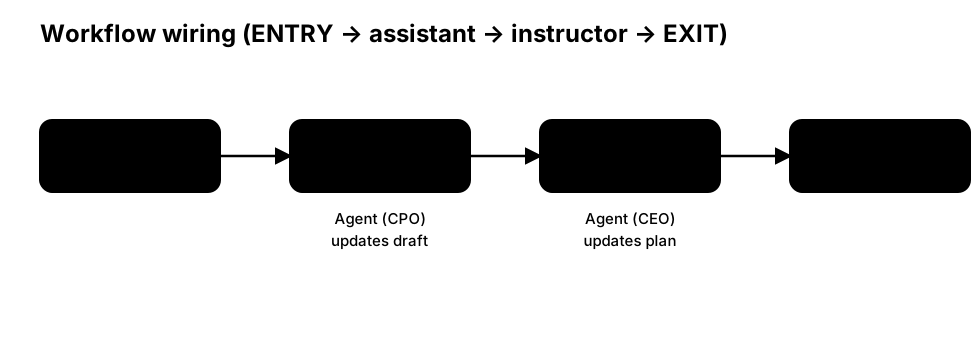
Start from the minimal phase:
ENTRY → instructor → assistant → EXIT
In this structure, Assistant produces a draft/result, and Instructor provides guidance to converge the output.
import os
from masfactory import RootGraph, Agent, OpenAIModel, NodeTemplate, HistoryMemory

# 1) Model adapter (OpenAI API as an example)
model = OpenAIModel(
    model_name=os.getenv("MODEL", "gpt-4o-mini"),
    api_key=os.getenv("OPENAI_API_KEY"),
    base_url=os.getenv("BASE_URL"),
)

history = HistoryMemory(top_k=12)

# 2) Declare two node templates (NodeTemplate)
Instructor = NodeTemplate(
    Agent,
    model=model,
    memories=[history],
    instructions="You are the Instructor. Read the user demand and guide the Assistant.\n",
    prompt_template="【USER DEMAND】\n{user_demand}\n\n",
)
Assistant = NodeTemplate(
    Agent,
    model=model,
    memories=[history],
    instructions="You are the Assistant. Complete the task based on user demand and Instructor guidance.\n",
    prompt_template=(
        "【USER DEMAND】\n{user_demand}\n\n"
        "【INSTRUCTOR GUIDANCE】\n{instructor_guidance}\n\n"
    ),
)

# 3) Assemble the graph with nodes/edges:
#    ENTRY → instructor → assistant → EXIT
#    Note: `Edge.keys` defines the message field contract. `Agent.output_keys` is aggregated from outgoing edges.
g = RootGraph(
    name="p1_workflow_decl",
    nodes=[
        ("assistant", Assistant),
        ("instructor", Instructor),
    ],
    edges=[
        ("ENTRY", "instructor", {"user_demand": "user demand"}),
        ("instructor", "assistant", {"instructor_guidance": "Instructor guidance"}),
        ("assistant", "EXIT", {"assistant_response": "Assistant response"}),
    ],
)

g.build()
message = {"user_demand": "Build a number guessing game."}
out, _attrs = g.invoke(message)
print(out["assistant_response"])
Step 2 — Multi-turn collaboration with Loop (edge messages)
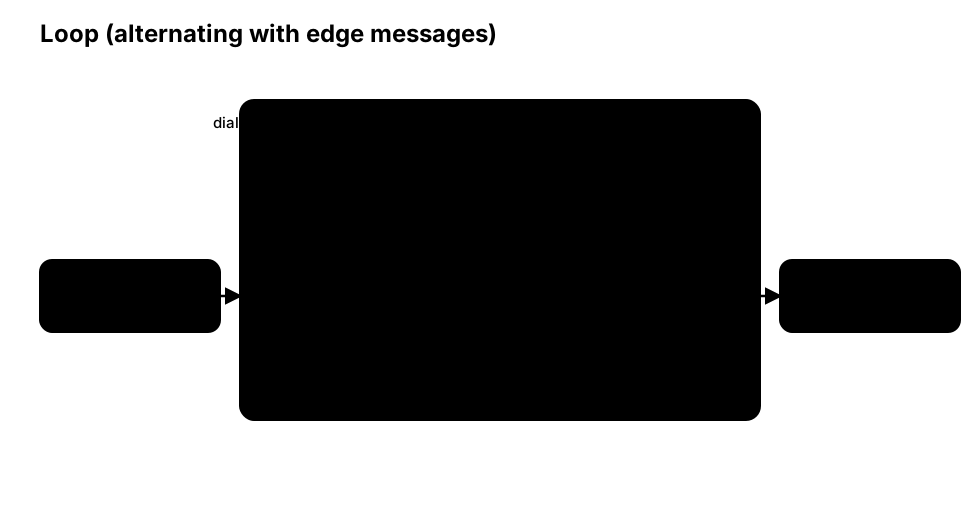
Step 1 runs only once. In practice, a phase usually needs multiple turns to converge.
Here we introduce Loop and place the Instructor → Assistant link inside the loop body. Each turn, fields are carried by edge keys.
import os
from masfactory import RootGraph, Loop, Agent, OpenAIModel, NodeTemplate, HistoryMemory

model = OpenAIModel(
    model_name=os.getenv("MODEL", "gpt-4o-mini"),
    api_key=os.getenv("OPENAI_API_KEY"),
    base_url=os.getenv("BASE_URL"),
)

history = HistoryMemory(top_k=12)

Instructor = NodeTemplate(
    Agent,
    model=model,
    memories=[history],
    instructions=(
        "You are the Instructor. Read the user demand and the previous assistant_response, then provide improvements.\n"
    ),
    prompt_template=(
        "【USER DEMAND】\n{user_demand}\n\n",
        "【ASSISTANT RESPONSE】\n{assistant_response}\n\n",
    ),
)
Assistant = NodeTemplate(
    Agent,
    model=model,
    memories=[history],
    instructions="You are the Assistant. Complete the task based on user demand and Instructor guidance.\n",
    prompt_template=(
        "【USER DEMAND】\n{user_demand}\n\n"
        "【INSTRUCTOR GUIDANCE】\n{instructor_guidance}\n\n"
    ),
)

DialogLoop = NodeTemplate(
    Loop,
    max_iterations=4,
    nodes=[
        ("assistant", Assistant),
        ("instructor", Instructor),
    ],
    edges=[
        # Loop does not use ENTRY/EXIT; it uses CONTROLLER as the scheduling endpoint.
        ("CONTROLLER", "instructor", {"user_demand": "user demand", "assistant_response": "previous Assistant response"}),
        ("instructor", "assistant", {"instructor_guidance": "Instructor guidance"}),
        ("assistant", "CONTROLLER", {"assistant_response": "Assistant response"}),
    ],
    # In the first turn, the instructor speaks before any assistant response exists.
    # Provide a default assistant_response to avoid missing-field errors.
    initial_messages={"assistant_response": "No assistant response yet."},
)

g = RootGraph(
    name="p2_loop_edge_decl",
    nodes=[("dialog", DialogLoop)],
    edges=[
        ("ENTRY", "dialog", {"user_demand": "user demand"}),
        ("dialog", "EXIT", {"assistant_response": ""}),
    ],
)

g.build()
message = {"user_demand": "Build a number guessing game."}
out, _attrs = g.invoke(message)
print(out["assistant_response"])
Step 3 — Switch + pull/push: assemble the core InstructorAssistantGraph structure
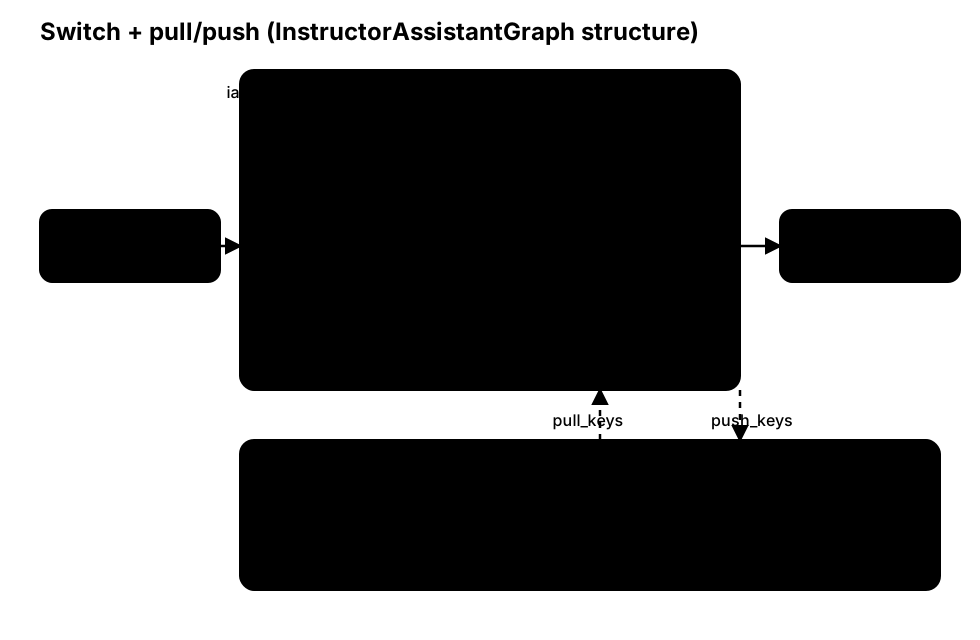
In Step 2, the loop body runs in a fixed order: every turn is Instructor → Assistant.
However, Step 2 also exposes a practical issue: on the first turn, the instructor may need to speak first (depending on the phase semantics), but the assistant has not produced assistant_response yet.
To support configurable “who speaks first”, and to reduce edge field-wiring overhead, we introduce:
LogicSwitch: route to different nodes based on a condition;pull_keys / push_keys: treat important fields (e.g.,task / draft / plan) as vertical state, synchronized viaattributesinstead of edge payloads.
import os
from masfactory import RootGraph, Loop, LogicSwitch, Agent, OpenAIModel, NodeTemplate, HistoryMemory

model = OpenAIModel(
    model_name=os.getenv("MODEL", "gpt-4o-mini"),
    api_key=os.getenv("OPENAI_API_KEY"),
    base_url=os.getenv("BASE_URL"),
)

history = HistoryMemory(top_k=12)

assistant_first = True  # a hyperparameter to decide speaking order

# LogicSwitch routes based on condition functions.
# Each condition receives two args: (messages, attributes).
# - messages: a dict aggregated from LogicSwitch.in_edges (edge payload)
# - attributes: a dict pulled from Loop attributes via pull_keys
def to_assistant(messages: dict, attributes: dict) -> bool:
    # Loop.Controller writes current_iteration into attributes (starting from 1).
    i = int(attributes.get("current_iteration", 0))
    return (i % 2 == 1) if assistant_first else (i % 2 == 0)

def to_instructor(messages: dict, attributes: dict) -> bool:
    return not to_assistant(messages, attributes)

Switch = NodeTemplate(LogicSwitch, routes={"assistant": to_assistant, "instructor": to_instructor})

Assistant = NodeTemplate(
    Agent,
    model=model,
    memories=[history],
    instructions="You are the Assistant (CPO). Improve the draft.\n",
    prompt_template=[
        "【Task】\n{task}\n\n",
        "【Current draft】\n{draft}\n\n",
    ],
    pull_keys={"task": "", "draft": "", "plan": ""},
    push_keys={"draft": "draft"},
)
Instructor = NodeTemplate(
    Agent,
    model=model,
    memories=[history],
    instructions="You are the Instructor (CEO). Review the draft and produce an executable plan.\n",
    prompt_template=[
        "【Task】\n{task}\n\n",
        "【Draft】\n{draft}\n\n",
        "【Current plan】\n{plan}\n\n",
    ],
    pull_keys={"task": "", "draft": "", "plan": ""},
    push_keys={"plan": "plan"},
)

Phase = NodeTemplate(
    Loop,
    max_iterations=4,
    pull_keys={"task": "", "draft": "", "plan": ""},
    push_keys={"draft": "", "plan": ""},
    nodes=[
        ("switch", Switch),
        ("assistant", Assistant),
        ("instructor", Instructor),
    ],
    edges=[
        ("CONTROLLER", "switch", {}),
        ("switch", "assistant", {}),
        ("switch", "instructor", {}),
        ("assistant", "CONTROLLER", {}),
        ("instructor", "CONTROLLER", {}),
    ],
)

g = RootGraph(
    name="p3_switch_attr_decl",
    attributes={"task": "Build a number guessing game.", "draft": "", "plan": ""},
    nodes=[("phase", Phase)],
    edges=[
        ("ENTRY", "phase", {}),
        ("phase", "EXIT", {}),
    ],
)

g.build()
_out, out_attrs = g.invoke({})
print(out_attrs["plan"])
At this point, we have a configurable Instructor/Assistant alternating structure.
Next, we reuse it to assemble multiple phases.
Step 4 — Reuse Phase
In ChatDev, a “phase” is not only an alternating dialogue structure: it should also carry phase-specific goals and constraints.
Here we introduce phase_instructions, and we synchronize explicit phase state (e.g., task / draft / plan) via pull_keys/push_keys instead of packing everything into a single carrier dict.
import os
from masfactory import Loop, LogicSwitch, Agent, OpenAIModel, NodeTemplate, HistoryMemory

model = OpenAIModel(
    model_name=os.getenv("MODEL", "gpt-4o-mini"),
    api_key=os.getenv("OPENAI_API_KEY"),
    base_url=os.getenv("BASE_URL"),
)

history = HistoryMemory(top_k=12)

assistant_first = True

def to_assistant(messages: dict, attributes: dict) -> bool:
    i = int(attributes.get("current_iteration", 0))
    return (i % 2 == 1) if assistant_first else (i % 2 == 0)

def to_instructor(messages: dict, attributes: dict) -> bool:
    return not to_assistant(messages, attributes)

Switch = NodeTemplate(LogicSwitch, routes={"assistant": to_assistant, "instructor": to_instructor})

Assistant = NodeTemplate(
    Agent,
    model=model,
    memories=[history],
    instructions="You are the Assistant (CPO). Update the draft. Output JSON with only fields that should be updated.",
    prompt_template=[
        "【Phase goal】\n{phase_instructions}\n",
        "【Task】\n{task}\n\n",
        "【Current draft】\n{draft}\n\n",
        "Update draft (string).",
    ],
    pull_keys={"phase_instructions": "", "task": "", "draft": "", "plan": ""},
    push_keys={"draft": "draft"},
)
Instructor = NodeTemplate(
    Agent,
    model=model,
    memories=[history],
    instructions="You are the Instructor (CEO). Update the plan. Output JSON with only fields that should be updated.",
    prompt_template=[
        "【Phase goal】\n{phase_instructions}\n",
        "【Task】\n{task}\n\n",
        "【Draft】\n{draft}\n\n",
        "【Current plan】\n{plan}\n\n",
        "Update plan (string); revise draft if necessary.",
    ],
    pull_keys={"phase_instructions": "", "task": "", "draft": "", "plan": ""},
    push_keys={"plan": "plan"},
)

Phase = NodeTemplate(
    Loop,
    max_iterations=3,
    pull_keys={"task": "", "draft": "", "plan": ""},
    push_keys={"draft": "", "plan": ""},
    attributes={"phase_instructions": ""},
    nodes=[("switch", Switch), ("assistant", Assistant), ("instructor", Instructor)],
    edges=[
        ("CONTROLLER", "switch", {}),
        ("switch", "assistant", {}),
        ("switch", "instructor", {}),
        ("assistant", "CONTROLLER", {}),
        ("instructor", "CONTROLLER", {}),
    ],
)

# Derive templates to reuse the structure while overriding phase-level attributes.
Demand = Phase(attributes={"phase_instructions": "Demand analysis: clarify goals and constraints."})
Language = Phase(attributes={"phase_instructions": "Language choosing: decide language and key dependencies."})
The “derived template” style (Demand = Phase(...)) is convenient for small numbers of phases.
When the number of phases grows, you can use template_overrides_for() to centralize overrides “by name/type”.
Step 5 — Deeper NodeTemplate reuse (assembly-time overrides)
Derived templates (Demand = Phase(...)) can override parameters on the current template level (e.g., Phase.pull_keys).
But they cannot directly override inner nodes (e.g., the instructions of the inner Instructor agent). For cross-level reuse, you need the “assembly-time override” mechanism.
For full rules, priority order, and runnable examples, see: NodeTemplate.
MASFactory provides 4 “template scope” helpers that apply during build (assembly) time:
template_defaults(**kwargs): global “fill missing defaults” (only applies when the template does not explicitly specify the arg).template_overrides(**kwargs): global “force override” (always overrides).template_defaults_for(selector...): scoped defaults (match by name/type).template_overrides_for(selector...): scoped force override (match by name/type;path_filtercan constrain by hierarchy).
Below shows how to override inner nodes during build:
from masfactory import Agent, Loop, template_defaults_for, template_overrides_for

# Note: these overrides take effect during build (template materialization), so wrap g.build().
with (
    # Example 1: default-fill a flag for all Agent nodes (only if not explicitly set)
    template_defaults_for(type_filter=Agent, hide_unused_fields=True),
    # Example 2: force-override the instructor instructions inside a specific Phase
    template_overrides_for(
        type_filter=Agent,
        name_filter="instructor",
        path_filter="demand_analysis>instructor",
        instructions="You are the Instructor (CEO). Review with stricter standards and cover risks/constraints.",
    ),
    # Example 3: override phase goal on a specific Phase (the Phase node is a Loop)
    template_overrides_for(
        type_filter=Loop,
        name_filter="demand_analysis",
        attributes={"phase_instructions": "Demand analysis: clarify goals/constraints and provide verifiable acceptance criteria."},
    ),
):
    g.build()
Notes
path_filteruses>as a separator.demand_analysis>instructormeans “the instructor node inside the demand_analysis phase”.- In the example above,
type_filter+name_filter+path_filterare used together for demonstration; in practice, not all of them are required.
Step 6 — Chain 6 phases into a simplified ChatDev Lite
Target topology:
ENTRY → demand_analysis → language_choose → coding → code_complete → coding_test → manual → EXIT
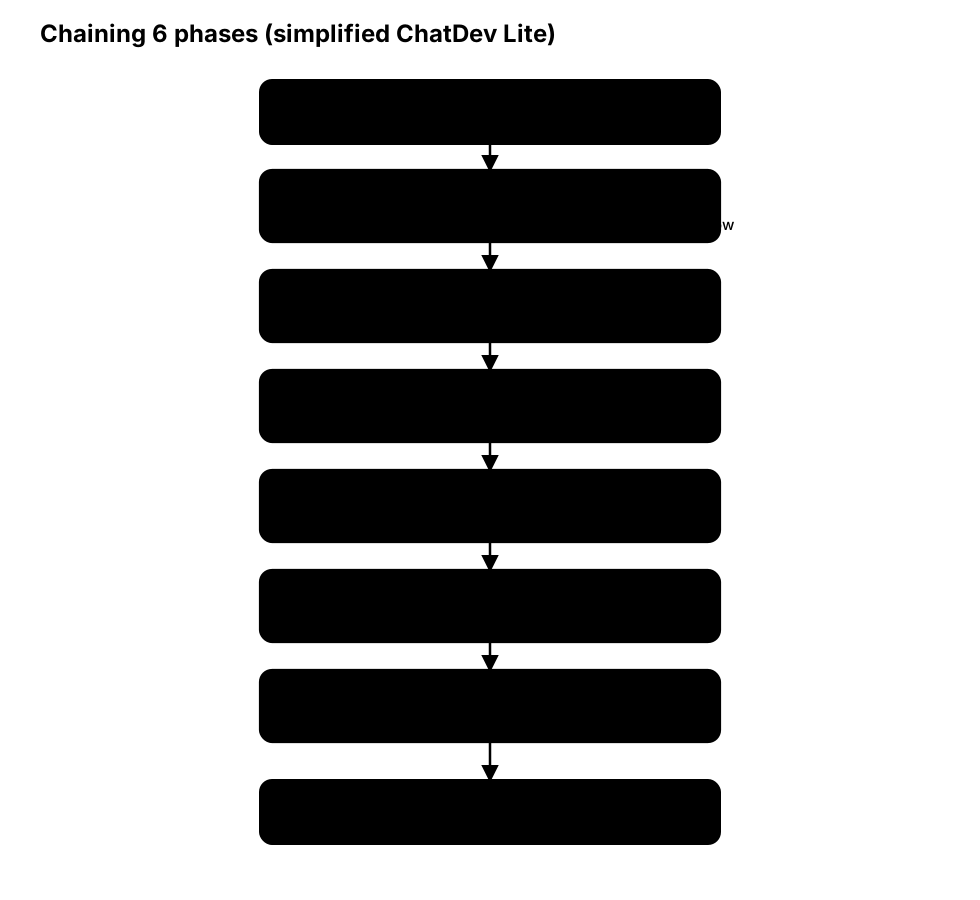
In this step, we reuse the original prompt configurations to assemble 6 phases.
Note
The original prompts are long. This tutorial focuses on the structure and code; you can obtain the full prompts from the original OpenBMB/ChatDev repo or the MASFactory repo.
import json
import os
from pathlib import Path
from contextlib import ExitStack

from masfactory import (
    RootGraph,
    Agent,
    LogicSwitch,
    Loop,
    OpenAIModel,
    NodeTemplate,
    HistoryMemory,
    template_overrides_for,
)

model = OpenAIModel(
    model_name=os.getenv("MODEL", "gpt-4o-mini"),
    api_key=os.getenv("OPENAI_API_KEY"),
    base_url=os.getenv("BASE_URL"),
)

history = HistoryMemory(top_k=12)

# 1) Load ChatDev Lite prompt configs (from this repo)
CONFIG_DIR = Path("applications/chatdev_lite/assets/config")
role_config = json.loads((CONFIG_DIR / "RoleConfig.json").read_text(encoding="utf-8"))
phase_config = json.loads((CONFIG_DIR / "PhaseConfig.json").read_text(encoding="utf-8"))
chat_chain_config = json.loads((CONFIG_DIR / "ChatChainConfig.json").read_text(encoding="utf-8"))

def join_lines(v: list[str] | str | None) -> str:
    if v is None:
        return ""
    if isinstance(v, list):
        return "\n".join(v)
    return str(v)

# 2) RootGraph attributes: shared state (minimal subset for demo)
attrs = {
    "task": "Develop a basic Gomoku game.",
    "chatdev_prompt": chat_chain_config.get("background_prompt", ""),
    "description": "",
    "ideas": "",
    "modality": "",
    "language": "",
    "codes": [],
    "unimplemented_file": "",
    "exist_bugs_flag": True,
    "test_reports": "",
    "error_summary": "",
    "requirements": "",
    "manual": "",
}

# 3) Shared pull/push (phases communicate via attributes, not edge payload)
phase_pull = {
    "task": "",
    "description": "",
    "ideas": "",
    "modality": "",
    "language": "",
    "codes": "",
    "unimplemented_file": "",
    "exist_bugs_flag": "",
    "test_reports": "",
    "error_summary": "",
    "requirements": "",
    "manual": "",
    "chatdev_prompt": "",
    "gui": "",
    "directory": "",
}
phase_push = {
    "modality": "",
    "language": "",
    "codes": "",
    "unimplemented_file": "",
    "test_reports": "",
    "error_summary": "",
    "requirements": "",
    "manual": "",
}

# 4) Phase blueprint: Loop + Switch + pull/push
#    (We intentionally do NOT use the built-in InstructorAssistantGraph here; we assemble the structure via NodeTemplate.)
assistant_first = False  # ChatDev Lite typically uses "instructor → assistant" order.

def to_assistant(messages: dict, attributes: dict) -> bool:
    i = int(attributes.get("current_iteration", 0))
    return (i % 2 == 1) if assistant_first else (i % 2 == 0)

def to_instructor(messages: dict, attributes: dict) -> bool:
    return not to_assistant(messages, attributes)

Switch = NodeTemplate(LogicSwitch, routes={"assistant": to_assistant, "instructor": to_instructor})

Assistant = NodeTemplate(
    Agent,
    model=model,
    memories=[history],
    instructions="",
    prompt_template=[
        "{chatdev_prompt}\n\n",
        "【Phase goal】\n{phase_instructions}\n\n",
        "【Task】\n{task}\n\n",
        "Update the necessary fields based on current state. Output JSON with only updated fields.",
    ],
    pull_keys={**phase_pull, "phase_instructions": ""},
    push_keys=phase_push,
)
Instructor = NodeTemplate(
    Agent,
    model=model,
    memories=[history],
    instructions="",
    prompt_template=[
        "{chatdev_prompt}\n\n",
        "【Phase goal】\n{phase_instructions}\n\n",
        "【Task】\n{task}\n\n",
        "Provide guidance/constraints for this phase. Output JSON with only updated fields.",
    ],
    pull_keys={**phase_pull, "phase_instructions": ""},
    push_keys=phase_push,
)

Phase = NodeTemplate(
    Loop,
    max_iterations=2,  # will be overridden per phase at build time (max_iterations = max_turns * 2)
    pull_keys=phase_pull,
    push_keys=phase_push,
    attributes={"phase_instructions": ""},
    nodes=[
        ("switch", Switch),
        ("assistant", Assistant),
        ("instructor", Instructor),
    ],
    edges=[
        ("CONTROLLER", "switch", {}),
        ("switch", "assistant", {}),
        ("switch", "instructor", {}),
        ("assistant", "CONTROLLER", {}),
        ("instructor", "CONTROLLER", {}),
    ],
)

g = RootGraph(
    name="chatdev_lite_simplified_decl_v2",
    attributes=attrs,
    nodes=[
        ("demand_analysis", Phase),
        ("language_choose", Phase),
        ("coding", Phase),
        ("code_complete", Phase),
        ("coding_test", Phase),
        ("manual", Phase),
    ],
    edges=[
        ("ENTRY", "demand_analysis", {}),
        ("demand_analysis", "language_choose", {}),
        ("language_choose", "coding", {}),
        ("coding", "code_complete", {}),
        ("code_complete", "coding_test", {}),
        ("coding_test", "manual", {}),
        ("manual", "EXIT", {}),
    ],
)

phase_plan = [
    ("demand_analysis", "DemandAnalysis", 3),
    ("language_choose", "LanguageChoose", 3),
    ("coding", "Coding", 1),
    ("code_complete", "CodeComplete", 3),
    ("coding_test", "TestErrorSummary", 1),
    ("manual", "Manual", 1),
]

with ExitStack() as stack:
    for node_name, phase_key, max_turns in phase_plan:
        spec = phase_config[phase_key]
        assistant_role = spec["assistant_role_name"]
        instructor_role = spec["user_role_name"]

        assistant_instructions = join_lines(role_config[assistant_role])
        instructor_instructions = join_lines(role_config[instructor_role])
        phase_instructions = join_lines(spec["phase_prompt"])

        stack.enter_context(
            template_overrides_for(
                type_filter=Loop,
                name_filter=node_name,
                max_iterations=max_turns * 2,
                attributes={"phase_instructions": phase_instructions},
            )
        )
        stack.enter_context(
            template_overrides_for(
                type_filter=Agent,
                name_filter="instructor",
                path_filter=f"{node_name}>instructor",
                instructions=instructor_instructions,
            )
        )
        stack.enter_context(
            template_overrides_for(
                type_filter=Agent,
                name_filter="assistant",
                path_filter=f"{node_name}>assistant",
                instructions=assistant_instructions,
            )
        )

    g.build()
out, out_attrs = g.invoke({})
print("done, manual bytes:", len(str(out_attrs.get("manual", ""))))
Note
- This chapter is designed for quickly learning MASFactory’s declarative paradigm, so it omits some implementation details of ChatDev. For complete reproductions, refer to: ChatDev-Lite or ChatDev.