

Core Concepts
This section introduces the core concepts of MASFactory: nodes, edges, graphs, workflows, node variables, message flow, and control flow.
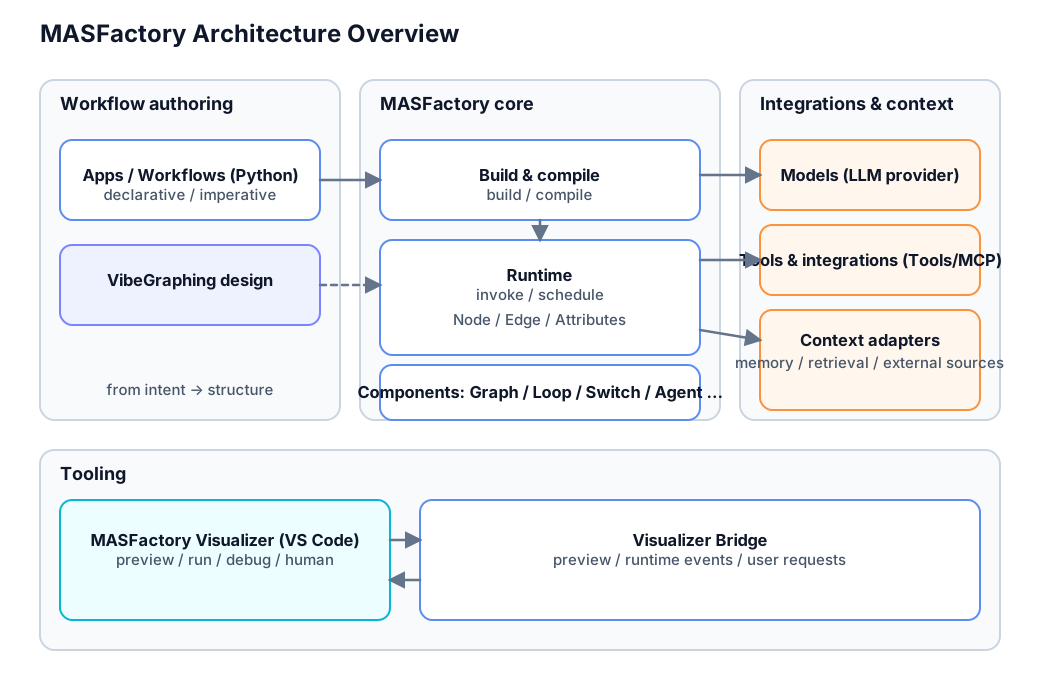
System Architecture Overview
Nodes
A Node is the basic computational unit in MASFactory and the core element that constitutes workflows. All components that perform computations in MASFactory graphs are derived classes of nodes.
Node Execution Mechanism
When a node is executed, the following steps are performed:
- Readiness Check: Check if all incoming edges have messages and gates are open
- Message Aggregation: Aggregate messages from all incoming edges into unified input
- Computation Processing: Call the
_forwardmethod to execute core computation logic - Message Distribution: Send computation results to downstream nodes through all outgoing edges
- State Update: Update node and edge states in preparation for the next execution round
Node Derived Classes
Derived classes of nodes mainly override the node's computation processing logic, i.e., the _forward function. A few components (such as Switch components) also override message aggregation and message distribution functions.
Node Types
MASFactory provides multiple node types:
- Agent Nodes: Agent nodes that encapsulate large language models, supporting tool calls and memory mechanisms
- Graph Nodes: Subgraph nodes that can nest other nodes to form complex workflow structures
- Switch Nodes: Conditional branch nodes that choose execution paths based on logical or semantic judgments
- CustomNode: Custom nodes that allow users to define specific computation logic through callback functions
Edges
An Edge connects two nodes and is responsible for flow control and message passing.
Main Functions of Edges
- Flow Control: Define execution order and dependency relationships between nodes
- Message Passing: Process output from upstream nodes and pass it to downstream nodes
- Data Filtering: Specify specific fields to be passed through the
keysparameter - Format Conversion: Use
MessageFormatterto format messages
Edge Components
- Sender Node: The source node of the message
- Receiver Node: The target node of the message
- Key Mapping (keys): Define fields to be passed and their natural language descriptions
- Message Formatting (formatter): Handle message format conversion
Graphs and Workflows
A Graph is a collection of nodes and edges, forming a directed acyclic graph composed of nodes and edges (except for the Controller loop in Loop), providing workflow organization and management capabilities. Graphs themselves are also a type of node, supporting nesting and reuse.
Graph Types
- RootGraph: Top-level executable graph that serves as the entry point for workflows and can be directly instantiated and called by users
- Graph: Subgraph nodes that can be nested in other graphs, providing modular workflow organization
- Loop: Loop graph that provides iteration control and loop termination judgment functionality
Main Functions of Graphs
- Node Management: Create and manage nodes in the graph through the
create_nodemethod - Edge Management: Create connection relationships between nodes through the
create_edgeseries methods - Integrity Checking: Ensure correctness of graph structure, including loop detection, isolated node checking, etc.
- Execution Control: Manage execution order of nodes within the graph and message passing
Graph Constraints
To ensure correct graph execution, the following constraints must be satisfied:
- There cannot be isolated nodes in the graph (nodes with in-degree or out-degree of 0)
- Loop structures cannot appear (use Loop components if loops are needed)
- Both nodes connected by edges in the graph must be internal nodes within this graph
- Entry and exit connections must use dedicated edge creation interfaces
Workflows
A Workflow is a complete multi-agent orchestration workflow implemented using RootGraph graphs.
A Sub-workflow is a local multi-agent orchestration workflow implemented using subgraph components such as Graph or Loop.
Lifecycle
The MASFactory workflow lifecycle includes three main phases: orchestration, build, and execution.
Orchestration Phase
In this phase, user-written graph construction code is executed to create the workflow structure:
- Graph Creation: Instantiate Graph or RootGraph objects
- Node Definition: Create various types of nodes using the
create_nodemethod - Edge Connection: Establish connection relationships between nodes using the
create_edgeseries methods - Structure Organization: Define hierarchical structure and nesting relationships of graphs
Build Phase
In this phase, the system calls the build() function to complete the preset configuration of the entire graph.
Execution Phase
After calling invoke(), the agent workflow begins execution, using a readiness-based scheduling mechanism:
- Readiness Check: Continuously scan the readiness status of all nodes
- Node Execution: Execute node computation logic in readiness order
- Message Passing: Pass computation results to downstream nodes
- State Update: Update node and edge state information
- Termination Judgment: Check if workflow termination conditions are met
Node Variables
Node Attributes are the shared state mechanism in MASFactory, allowing nodes to share and pass state information. Node variables adopt a hierarchical design, supporting inheritance of variables from upper-level environments and writing computation results back to upper-level and local environments.
Node Variable Management Mechanism
Node variables are a unified state management mechanism where each node has its own _attributes_store to store variables:
- Variable Storage: Each node maintains an independent
_attributes_storevariable storage space - Variable Passing: Variables from parent graphs (upper-level environments) are passed to child nodes, forming nested variable scopes
- Variable Inheritance: Child nodes can obtain required variables from upper-level environments through
pull_keys - Variable Writeback: Nodes can update computation results to local and upper-level variable storage spaces through
push_keys
Variable Control Mechanism
Node variables are precisely controlled through three core parameters:
pull_keys (Variable Extraction Control)
Controls which variable fields are extracted from the upper-level environment (outer_env) to the local environment:
None: Completely inherit all variables from upper-level environment (self._attributes_store = outer_env.copy())Non-empty dictionary: Extract corresponding fields from upper-level environment according to keys specified in dictionary (key is variable name, value is description)Empty dictionary: Do not inherit any upper-level variables (self._attributes_store = {})
push_keys (Variable Writeback Control)
Controls which output fields are written back to local and upper-level environments after node execution completion:
None: Writeback strategy depends onpull_keyssetting- When
pull_keysisNone: Write back all keys that exist in both output and localattributes - When
pull_keysis a non-empty dictionary: Only write back keys specified inpull_keys - When
pull_keysis an empty dictionary: Do not write back any variables
- When
Non-empty dictionary: Only write back keys specified in dictionary (key is variable name, value is description)Empty dictionary: Do not write back any variables
attributes (Initial Local Variables)
Initial local variables of the node, not affected by pull_keys and push_keys, directly set to _attributes_store during node initialization.
Node Type Differences
Important Reminder
Different types of nodes have different default values for pull_keys and push_keys:
- Agent Nodes: Both default to empty dictionary
{}, meaning no inheritance or writeback of variables by default - Non-Agent Nodes: Both default to
None, meaning full inheritance and writeback of variables by default
Role of Node Variables During Node Execution
During node execution, variable processing follows this workflow:
Variable Extraction Phase (
_pull_attributes)- Called at the beginning of node execution
- Extract variables from upper-level environment to local according to
pull_keysrules
Business Logic Processing
- Execute the node's
_forwardmethod - Use local variables for computation
- Execute the node's
Variable Writeback Phase
- Local Writeback (
_attributes_push_local): Write output back to local_attributes_store - Upper-level Writeback (
_attributes_push_outer): Write local variables back to upper-level environment
- Local Writeback (
Special Handling for Agent Nodes
For Agent nodes, description information in pull_keys and push_keys has special significance:
- pull_keys descriptions: Added to Agent's prompt to inform the Agent what variables are accessible and their meanings
- push_keys descriptions: Added to Agent's prompt to guide the Agent on what fields to output and their purposes
Variable Usage Scenarios
- State Sharing: Share computation state and intermediate results among multiple nodes
- Parameter Passing: Pass configuration parameters and initial data to subcomponents
- Result Aggregation: Collect and aggregate computation results from various nodes to upper-level environment
- Conditional Judgment: Provide judgment basis for branch nodes and control nodes
- Context Passing: Pass execution context in nested graph structures
- Memory Mechanism: Maintain state continuity during loops and iterations
Message Flow
Message Flow describes the data passing process and format conversion mechanisms in workflows. For a focused split of horizontal (edge) and vertical (attributes) passing, see: Message Update and Passing (Horizontal / Vertical).
Two-layer model (recommended mental model)
- Horizontal messages (Edge): node output fields move along edges;
keysdecides what downstream receives. - Vertical messages (attributes): nodes read/write graph context via
pull_keys/push_keys.
Recommended split:
- Put business payload (content, scores, outputs) on horizontal messages.
- Put process state (counters, retries, stage flags) in vertical attributes.
Related examples:
- Horizontal-first:
/examples/sequential_workflow,/examples/parallel_branching - Vertical-first:
/examples/attributes - Mixed:
/examples/looping
Basic Concepts of Messages
- Message Objects: Carriers that encapsulate data content and format information
- Message Formatters: Components responsible for message format conversion
- Message Aggregation: Merge multiple input messages into unified format
- Message Distribution: Send output messages to all downstream nodes
Message Processing Flow
- Message Generation: Upstream nodes produce output messages
- Formatting: Format conversion through MessageFormatter
- Transmission: Messages are passed to downstream nodes through edges
- Aggregation: Downstream nodes aggregate all input messages
- Parsing: Parse message content into formats processable by nodes
Message Format Types
- JSON Format: Standard format for structured data
- Text Format: Simple string messages
- Custom Format: Support special formats through custom MessageFormatter
Control Flow
Control Flow defines the order and conditions of node execution and is the core mechanism of workflow scheduling.
State-based Scheduling
MASFactory adopts dynamic scheduling based on node states:
- Readiness Conditions: All incoming edges have messages and
Gatestatus isOpen - Execution Queue: Maintain queue of currently executable nodes
- Concurrent Execution: Support concurrent processing of multiple ready nodes
Control Structures
- Sequential Control: Nodes execute in order according to dependency relationships
- Branch Control: Implement conditional branches through Switch nodes
- Loop Control: Implement iteration logic through Loop graphs
- Parallel Control: Concurrent execution of independent branches