

Context Adapters (RAG / Memory / MCP)
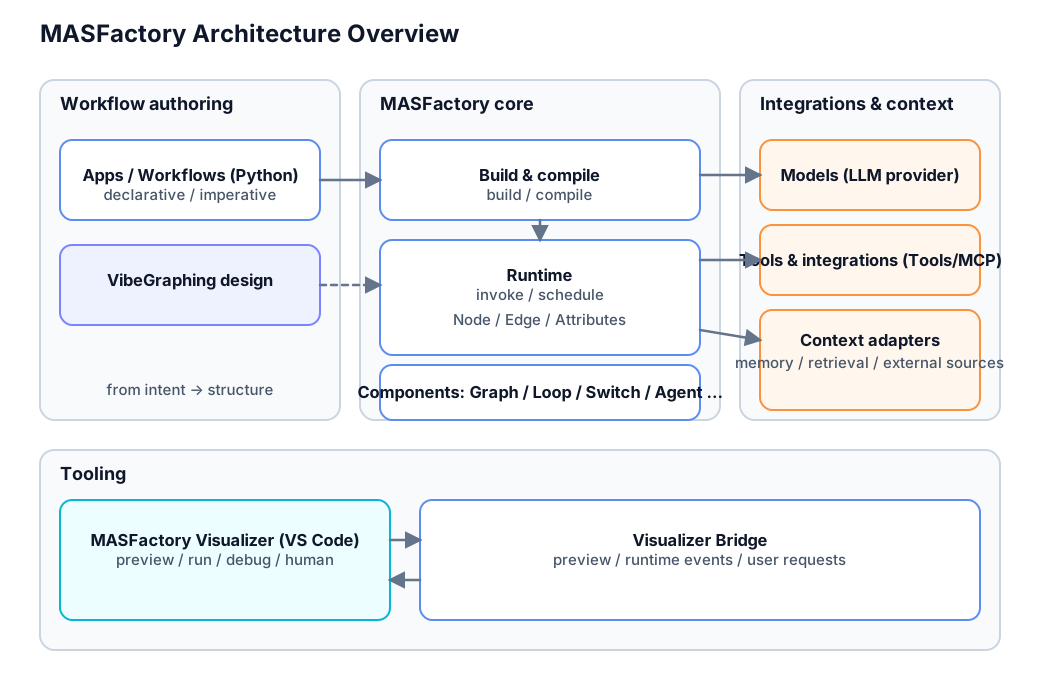
MASFactory treats “LLM context” as a first-class concern and provides a unified adapter layer for:
- Memory (write + read)
- RAG retrieval (read-only)
- MCP (external tools/services as context sources)
All of them ultimately produce the same unit: ContextBlock, injected into the Agent user payload during observe().
Where to read the code (source of truth)
- Context types/pipeline:
masfactory/adapters/context/ - Memory:
masfactory/adapters/memory.py - Retrieval:
masfactory/adapters/retrieval.py - MCP:
masfactory/adapters/mcp.py - Agent injection:
masfactory/components/agents/agent.py
1) How to use: plug Memory / RAG / MCP into an Agent
In MASFactory, context sources are attached via:
Agent(..., memories=[...], retrievers=[...])
At runtime, Agent.observe() will:
- build a structured user payload (
dict) - call
get_blocks(...)on every provider withpassive=True - inject rendered context into
user_payload["CONTEXT"] - let the input formatter dump the payload into the final user prompt text
Notes:
memories: usually writable Memory backends (automatically written after each Agent step), but can also be used as read-only context sources.retrievers: usually read-only Retrieval/MCP providers.
For how prompts/messages are assembled (payload fields, formatters, output constraints), see /guide/agent_runtime.
1.1 Example: conversation history (HistoryMemory)
HistoryMemory is a special memory type: it does not inject blocks into CONTEXT. Instead, it contributes chat messages (history) inserted into the model messages list.
from masfactory import Agent, HistoryMemory

history = HistoryMemory(top_k=6)
history.insert("user", "Hi — I want to learn MASFactory.")
history.insert("assistant", "Sure. Are you focused on orchestration, debugging, or visualization?")

agent = Agent(
    name="demo",
    model=object(),  # observe() only; no real model call
    instructions="You are a concise assistant.",
    prompt_template="{query}",
    memories=[history],
)

_system_prompt, _user_prompt, messages = agent.observe({"query": "Summarize MASFactory in one sentence."})
print([m["role"] for m in messages])
# ["system", "user", "assistant", "user"]
1.2 Example: semantic memory (VectorMemory)
VectorMemory stores items as embeddings and retrieves relevant items during Observe using ContextQuery.query_text. Hits are injected as ContextBlock under CONTEXT.
The example below uses SimpleEmbedder (no external dependency; good for demos). For production, use a higher-quality embedder such as OpenAIEmbedder or SentenceTransformerEmbedder.
from masfactory import Agent, VectorMemory, SimpleEmbedder

embedding_fn = SimpleEmbedder(vocab_size=512).get_embedding_function()

mem = VectorMemory(
    embedding_function=embedding_fn,
    context_label="MEMORY",
    query_threshold=0.15,  # demo: lower threshold so it’s easier to hit
    passive=True,
    active=False,
)

# You can preload knowledge before running, or rely on Agent.step() to write into memory automatically.
mem.insert("project", "MASFactory is a graph-native multi-agent orchestration framework.")
mem.insert("visualizer", "MASFactory Visualizer provides topology preview and runtime tracing.")

agent = Agent(
    name="demo",
    model=object(),
    instructions="You are a concise assistant.",
    prompt_template="{query}",
    memories=[mem],
)

_, user_prompt, _ = agent.observe({"query": "What does MASFactory Visualizer do?"})
print(user_prompt)  # you will see a CONTEXT field in the user prompt
1.3 Example: RAG retrieval (Retrieval)
Retrieval providers are read-only context sources. They turn your corpus (docs, wiki, code index, etc.) into ContextBlock and inject them into CONTEXT during Observe.
A) Small corpora: SimpleKeywordRetriever
Useful for demos or small text sets; no embeddings required.
from masfactory import Agent, SimpleKeywordRetriever

docs = {
    "quickstart": "MASFactory builds workflows as graphs (nodes + edges).",
    "visualizer": "MASFactory Visualizer previews graphs and runtime traces.",
}

retriever = SimpleKeywordRetriever(docs, context_label="DOCS", passive=True, active=False)

agent = Agent(
    name="demo",
    model=object(),
    instructions="You are a concise assistant.",
    prompt_template="{query}",
    retrievers=[retriever],
)

_, user_prompt, _ = agent.observe({"query": "What is Visualizer for?"})
print(user_prompt)
B) Directory indexing: FileSystemRetriever (embeddings)
Index a directory of files (Markdown/plain-text, etc.) and retrieve by embedding similarity.
from masfactory import Agent, FileSystemRetriever, SimpleEmbedder

embedding_fn = SimpleEmbedder(vocab_size=512).get_embedding_function()

retriever = FileSystemRetriever(
    docs_dir="./docs",
    file_extension=".md",
    embedding_function=embedding_fn,
    similarity_threshold=0.15,     # demo: lower threshold
    cache_path=".cache/docs.json", # optional embedding cache
    context_label="DOCS_FS",
)

agent = Agent(
    name="demo",
    model=object(),
    instructions="You are a concise assistant.",
    prompt_template="{query}",
    retrievers=[retriever],
)

_, user_prompt, _ = agent.observe({"query": "How do I install MASFactory?"})
print(user_prompt)
1.4 Example: external context via MCP
When context comes from an external service (enterprise wiki, search, data platform, etc.), you can use the MCP adapter to map “external retrieval results” into ContextBlock.
from masfactory import Agent
from masfactory.adapters.context.types import ContextQuery
from masfactory.adapters.mcp import MCP

def call_mcp(query: ContextQuery, top_k: int):
    # Stub for docs: call your MCP server/tool here and return a list of items.
    return [{"text": f"[Wiki] entry for: {query.query_text}", "uri": "mcp://wiki/entry/1", "score": 0.92}]

wiki = MCP(name="WIKI", call=call_mcp, passive=True, active=False)

agent = Agent(
    name="demo",
    model=object(),
    instructions="You are a concise assistant.",
    prompt_template="{query}",
    retrievers=[wiki],
)

_, user_prompt, _ = agent.observe({"query": "What are MASFactory core components?"})
print(user_prompt)
1.5 Combining multiple sources
You can configure multiple Memory/Retrieval/MCP providers at once. They are rendered and injected into a single CONTEXT field (the default renderer prefixes each block with the provider label).
from masfactory import Agent, HistoryMemory, VectorMemory, SimpleEmbedder, SimpleKeywordRetriever
from masfactory.adapters.mcp import MCP
from masfactory.adapters.context.types import ContextQuery

embedding_fn = SimpleEmbedder(vocab_size=512).get_embedding_function()

history = HistoryMemory(top_k=6)
mem = VectorMemory(embedding_function=embedding_fn, context_label="MEMORY", query_threshold=0.15)
mem.insert("note", "A Graph consists of nodes and edges.")

docs = SimpleKeywordRetriever({"doc": "Visualizer previews graphs."}, context_label="DOCS")

def call_mcp(query: ContextQuery, top_k: int):
    return [{"text": "external snippet", "uri": "mcp://demo"}]

wiki = MCP(name="WIKI", call=call_mcp)

agent = Agent(
    name="demo",
    model=object(),
    instructions="You are a concise assistant.",
    prompt_template="{query}",
    memories=[history, mem],
    retrievers=[docs, wiki],
)

_, user_prompt, messages = agent.observe({"query": "Explain what Visualizer does."})
print([m["role"] for m in messages])  # includes history messages
print(user_prompt)                   # includes CONTEXT
2) Passive vs Active: auto-inject vs on-demand tools
Each provider can be configured as:
2.1 Passive (auto inject into CONTEXT)
passive=True: Agent callsget_blocks(...)during Observe- selected blocks are injected into the user payload under
CONTEXT - the input formatter controls how the payload becomes the final user prompt text
2.2 Active (on-demand retrieval via tools)
active=True: Agent exposes two tools to the model for that run:list_context_sources()retrieve_context(source, query, top_k=...)
- useful when retrieval is expensive or when “reason first, retrieve later” is desired
Convention (most built-ins):
top_k=0means “as many as possible”top_k<0returns empty
Example: expose a retriever as a Tool (Active Retrieval)
The example below configures a SimpleKeywordRetriever as active=True (and passive=False), so it will not auto-inject CONTEXT. Instead, MASFactory exposes retrieval tools that the model can call on demand:
from masfactory import Agent, SimpleKeywordRetriever

docs = {
    "quickstart": "MASFactory builds workflows as graphs (nodes + edges).",
    "visualizer": "MASFactory Visualizer previews graphs and runtime traces.",
}

retriever = SimpleKeywordRetriever(
    docs,
    context_label="DOCS",
    passive=False,  # do not auto-inject CONTEXT
    active=True,    # expose as tool-call sources
)

agent = Agent(
    name="demo",
    model=object(),  # observe() only
    instructions="When you need external information, list sources first, then retrieve on demand.",
    prompt_template="{query}",
    retrievers=[retriever],
)

agent.observe({"query": "What is MASFactory Visualizer?"})
print([t.__name__ for t in agent.tools])
# includes: list_context_sources / retrieve_context
Combine with your own tools
Active retrieval tools are exposed together with Agent(tools=[...]) tools.
from datetime import datetime, timezone
from masfactory import Agent, SimpleKeywordRetriever

def get_utc_now() -> str:
    \"\"\"Get current UTC time in ISO format.\"\"\"
    return datetime.now(timezone.utc).isoformat()

retriever = SimpleKeywordRetriever({"doc": "..."}, passive=False, active=True)

agent = Agent(
    name="demo",
    model=object(),
    instructions="Call tools when needed.",
    prompt_template="{query}",
    tools=[get_utc_now],
    retrievers=[retriever],
)

agent.observe({"query": "..."})
print([t.__name__ for t in agent.tools])
3) Two key types: ContextQuery / ContextBlock
ContextBlock: smallest injectable unit
A ContextBlock is one unit that may be injected into LLM context. It can carry optional debugging metadata:
text(required)uri / chunk_id(optional provenance)score(optional relevance)title / metadata / dedupe_key(optional)
ContextQuery: normalized query to providers
MASFactory builds a ContextQuery per Agent step, commonly including:
query_text: best-effort retrieval query extracted from inputsinputs: current step inputs (plus fields used for templating)attributes: current node attributes (vertical state)node_name: current node namemessages: injected history messages (if any)
Providers can use these to decide retrieval strategy.
4) Extending: implement a ContextProvider
The minimal contract is just get_blocks(...):
from masfactory.adapters.context.types import ContextBlock, ContextQuery

class MyProvider:
    context_label = "MY_SOURCE"
    passive = True
    active = False
    supports_passive = True
    supports_active = True

    def get_blocks(self, query: ContextQuery, *, top_k: int = 8) -> list[ContextBlock]:
        return [ContextBlock(text="...")]
Then plug it into an Agent via memories=[...] or retrievers=[...] (Agents treat both as context sources).
5) Integration example: MemoryOS (Native / MCP)
MASFactory includes two MemoryOS integration shapes:
- Native (in-process):
MemoryOSMemoryimplementsMemory - MCP (out-of-process):
make_memoryos_mcp(...)returns anMCPprovider
Source: masfactory/integrations/memoryos.py
5.1 Native: MemoryOSMemory (Memory interface)
from masfactory import Agent
from masfactory.adapters.context.types import ContextQuery
from masfactory.integrations.memoryos import MemoryOSMemory

def memoryos_retrieve(query: ContextQuery, top_k: int):
    # TODO: call your MemoryOS client here
    return [{"text": f"[MemoryOS] hit for: {query.query_text}", "uri": "memoryos://demo", "score": 0.9}]

mem = MemoryOSMemory(
    retrieve=memoryos_retrieve,
    insert_fn=lambda k, v: None,  # optional: write Agent outputs back to MemoryOS
    passive=True,
    active=False,
)

agent = Agent(
    name="demo",
    model=object(),  # observe() only
    instructions="You are a concise assistant.",
    prompt_template="{query}",
    memories=[mem],
)

_, user_prompt, _ = agent.observe({"query": "Explain context blocks"})
print(user_prompt)
5.2 MCP: make_memoryos_mcp (MCP transport)
from masfactory import Agent
from masfactory.adapters.context.types import ContextQuery
from masfactory.integrations.memoryos import make_memoryos_mcp

def mcp_call(query: ContextQuery, top_k: int):
    # TODO: call your MCP server/tool here
    return [{"text": f"[MemoryOS/MCP] hit: {query.query_text}", "uri": "mcp://memoryos"}]

mcp_provider = make_memoryos_mcp(call=mcp_call, passive=True, active=False)

agent = Agent(
    name="demo",
    model=object(),
    instructions="You are a concise assistant.",
    prompt_template="{query}",
    retrievers=[mcp_provider],
)

_, user_prompt, _ = agent.observe({"query": "What is MemoryOS?"})
print(user_prompt)
6) Integration example: UltraRAG (Native / MCP)
MASFactory provides two shapes:
- Native (in-process):
UltraRAGRetrieverimplementsRetrieval - MCP (out-of-process):
make_ultrarag_mcp(...)returns anMCPprovider
Source: masfactory/integrations/ultrarag.py
6.1 Native: UltraRAGRetriever (Retrieval)
from masfactory import Agent
from masfactory.adapters.context.types import ContextQuery
from masfactory.integrations.ultrarag import UltraRAGRetriever

def ultrarag_retrieve(query: ContextQuery, top_k: int):
    # TODO: call your UltraRAG client here
    return [{"text": f"[UltraRAG] doc for: {query.query_text}", "uri": "ultrarag://doc/1", "score": 0.82}]

rag = UltraRAGRetriever(retrieve=ultrarag_retrieve, passive=True, active=False)

agent = Agent(
    name="demo",
    model=object(),
    instructions="You are a concise assistant.",
    prompt_template="{query}",
    retrievers=[rag],
)

_, user_prompt, _ = agent.observe({"query": "How does MASFactory work?"})
print(user_prompt)
6.2 MCP: make_ultrarag_mcp (MCP transport)
from masfactory import Agent
from masfactory.adapters.context.types import ContextQuery
from masfactory.integrations.ultrarag import make_ultrarag_mcp

def mcp_call(query: ContextQuery, top_k: int):
    # TODO: call your MCP server/tool here
    return [{"text": f"[UltraRAG/MCP] {query.query_text}", "uri": "mcp://ultrarag"}]

mcp_rag = make_ultrarag_mcp(call=mcp_call, passive=True, active=False)

agent = Agent(
    name="demo",
    model=object(),
    instructions="You are a concise assistant.",
    prompt_template="{query}",
    retrievers=[mcp_rag],
)

_, user_prompt, _ = agent.observe({"query": "RAG with context blocks"})
print(user_prompt)